By Hamza Ali. Last updated: July 2026.
A Lahore electronics retailer spending PKR 4 million a month on Google Shopping is on track to lose control of where that money goes. On August 31, 2026, Google enables Local Inventory Ads by default inside any Shopping campaign linked to a Merchant Center account with the LIA add-on switched on. That single setting change redirects clicks and budget toward in-store inventory the account owner never planned to promote.
Here’s the thing. Teams miss this because the warning sits inside Merchant Center, not inside Google Ads where the daily work happens. We see it across Pakistani retail accounts in Lahore, Karachi, and Faisalabad: a checkbox nobody remembers ticking becomes the default that quietly reshapes the campaign. The August 31 date is fixed, and Google does not send a personalized warning to each advertiser, so the next two weeks are the real window.
Think of it like ordering a Careem to one destination and finding the app has silently added a second stop. You still pay for the whole ride, but part of it goes somewhere you never asked to go. That is exactly what the Local Inventory Ads default does to a Shopping budget.
What Google actually changed on August 31
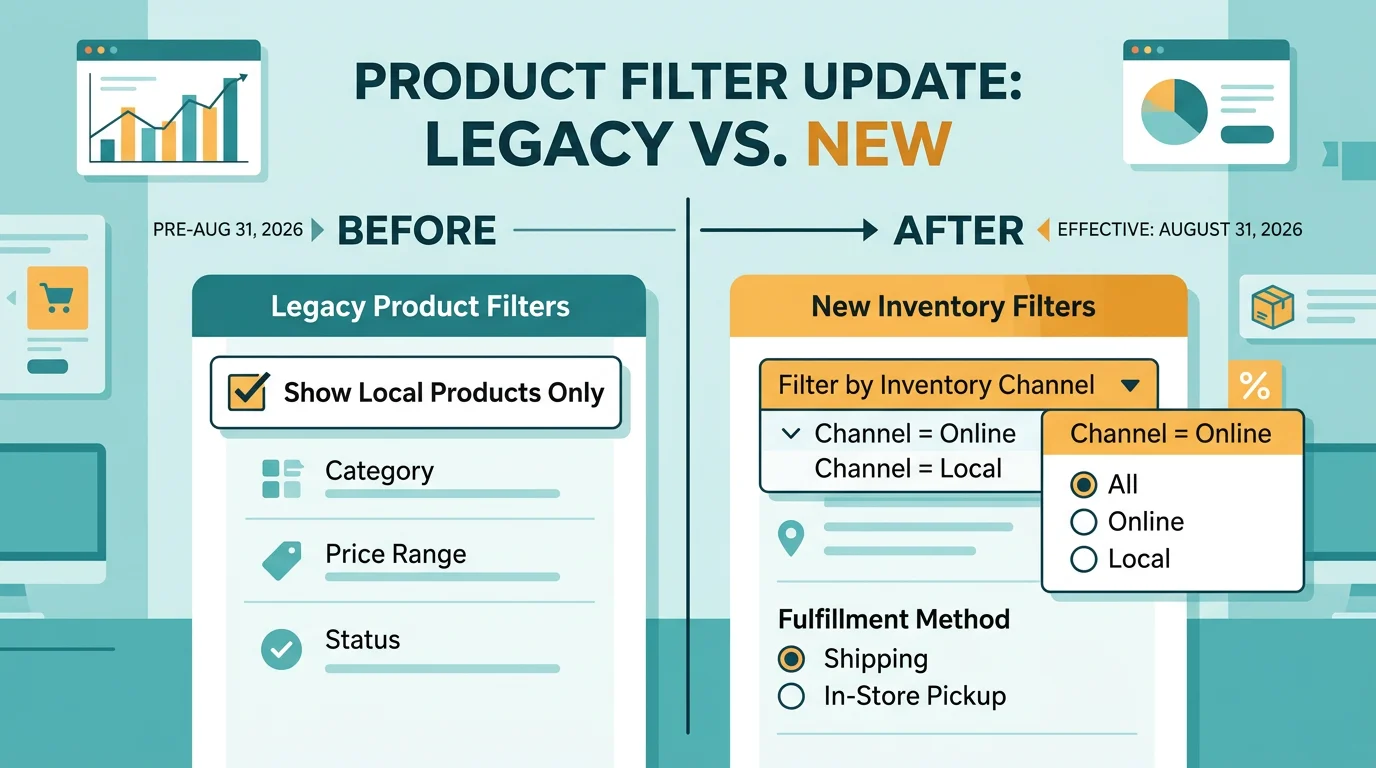
Local Inventory Ads — Google Shopping ad format that shows nearby in-store stock, price, and store location to shoppers searching on mobile. Up to now, retailers opted in by ticking a “Local products” box under campaign settings.
From August 31, 2026, that box disappears. Google replaces it with a new control called the Inventory filter, and the default state is to serve local inventory for any campaign tied to a Merchant Center account where the LIA add-on is enabled. Search Engine Land reported the change in mid-July, and Google’s Merchant Center documentation confirms the August 31 cutover.
For a pure-online Daraz-style seller with no physical store, the default is harmless. The add-on never activates, so nothing changes. But for a Pakistani retailer with even one outlet in Liberty Market, Saddar, or Gulberg, the default flips the campaign into blended online-plus-local serving unless someone intervenes before the deadline.
The setup that quietly burns budget
Take a Karachi fashion chain with three outlets running a PKR 1.2 million monthly Shopping budget. Before August 31, every rupee targets online checkout. After August 31, Google treats in-store SKUs as eligible to serve alongside online SKUs, with no separate budget envelope.
In practice the campaign starts spending on clicks that drive foot traffic the retailer cannot attribute. A click on a “women’s unstitched lawn suit” ad may resolve to a store-locator card instead of a product page. The conversion tracking built for online checkout fires on fewer of those clicks. ROAS appears to collapse, even though the store may be busier. This is the same class of budget that quietly leaks after the click, except here the leak is created by a Google default rather than a targeting mistake.
We see this pattern most acutely in Pakistani retail verticals that run both an ecommerce site and a showroom: electronics, appliances, furniture, and apparel. The smarter operators pre-empt it by splitting the campaign structure now, not after the default lands. The lever is separation — one campaign for online ROAS, one for store visits — and the cost of not pulling it is a month of unreadable performance data.
Where the Performance Max reporting shift adds to the confusion
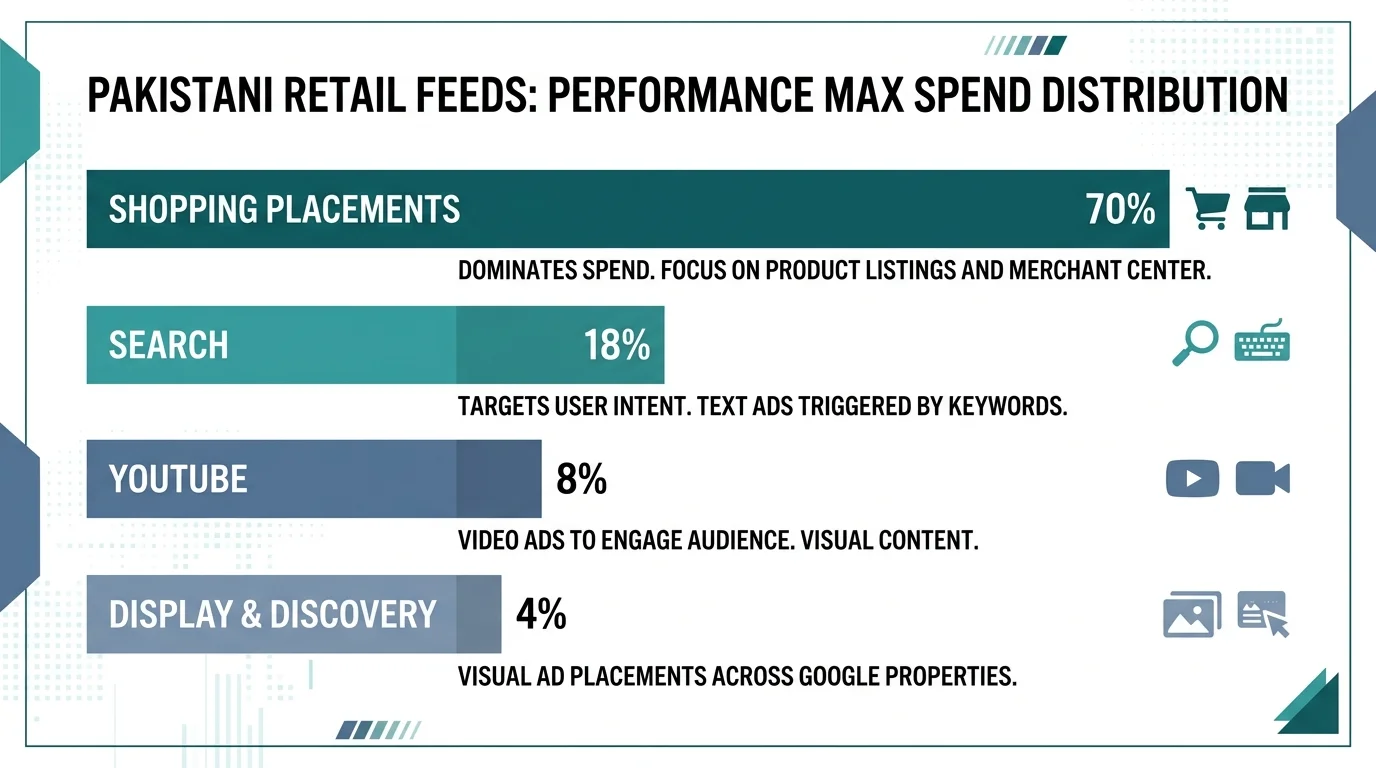
A second change compounds the problem. On June 15, 2026, Google expanded Performance Max product reporting — the campaign type that uses machine learning to buy ads across every Google network from one budget — to include data from all networks, not just Shopping and Search. Before that date, product-level metrics in Google Ads only counted Search and Standard Shopping activity. Now they pull in YouTube, Display, Discovery, and Demand Gen placements too.
Search Engine Roundtable confirmed the rollout. The practical consequence is a one-time step-change in every product report: cost, clicks, and conversions look larger from mid-June onward because more networks are counted. A retailer comparing July product performance to May numbers sees an apparent jump that is really just a reporting boundary shift. Operators who also track zero-click search behavior for Pakistani advertisers already know how easily misread metrics lead to bad budget calls.
Combine that with the August 31 Local Inventory default, and a Pakistani retail account ends up with two simultaneous changes to its numbers: reporting scope widens in June, and serving scope widens in August. Without a clean before-and-after baseline, the team chases ghosts instead of fixing the actual lever.
Smarter Ecommerce’s State of Performance Max data shows 93 percent of retailers running Google Shopping ads already use Performance Max, and practitioner analyses estimate 50 to 80 percent of Pakistani advertisers already run Advantage+ or Performance Max. That means most readers of this post are exposed to both changes at once, whether they realize it or not.
The 15-minute settings fix
The lever here is the Inventory filter, and the fix takes about fifteen minutes per campaign. Open each Shopping campaign in Google Ads, go to Settings, and locate the new Inventory filter that replaces the old “Local products” checkbox. Set Channel = Online for any campaign whose budget is meant to drive ecommerce checkout. Set Channel = Local only for a dedicated campaign built to drive store visits, with its own budget and ideally its own conversion action for in-store visits.
Do not leave the default on a mixed channel if you need separate ROAS tracking for online versus local. Google’s own guidance, summarized by Search Engine Land, is explicit: advertisers who want separate budgets for online and local inventory must update the Inventory filter to specify the channel they want rather than rely on the legacy checkbox.
The other half of the fix is feed health. Local Inventory Ads require three feeds in Merchant Center: a main product feed, a local product feed, and a stores feed. If any of those feeds carries stale prices, wrong store hours, or missing GTINs, the default activation surfaces the errors as live ads rather than suppressing them. The same feed discipline that protects Merchant Center setup for Pakistani stores is what stops the August default from turning feed errors into wasted spend.
What Pakistani retailers should do this week
This is not a notice to read and ignore. The August 31 date is fixed, and Google does not send a personalized warning to each advertiser. Treat the next two weeks as the window.
Checklist for any Pakistani retailer running Google Shopping with a physical store:
- Log into Merchant Center and check whether the Local Inventory Ads add-on is enabled. If it is on and you have stores, proceed to step 2. If it is on and you have no stores, switch it off.
- In Google Ads, open every Shopping campaign and set the Inventory filter Channel to Online for ecommerce budgets and Local for dedicated store-traffic budgets.
- Audit the three required feeds — main product, local product, stores — for price accuracy, store hours, and GTIN completeness.
- Snapshot your June 15 Performance Max product reports as the new baseline. Label any comparison after that date as cross-network, not Shopping-only.
- Separate conversion actions for online orders and store visits before the default lands, so post-August ROAS stays readable.
- If you run a multi-location chain, verify your Google Business Profile listings match the stores feed. Mismatched addresses trigger disapprovals under the new serving logic.
Read next: Where Pakistani ad budgets quietly leak after the click and why Performance Max hides the hole.
At WeProms Digital, we run Google Ads management and optimization for Pakistani retailers across Lahore, Karachi, and Islamabad, and our Merchant Center management team handles the feed and settings audits that prevent exactly this kind of default-driven waste. If you have a physical store and a Shopping campaign, book a 30-minute audit before August 31 so the settings and feeds are clean when the default lands. Reach us at hello@weproms.com or WhatsApp +92 300 0133399.
Frequently Asked Questions
What happens on August 31, 2026, to my Google Shopping campaigns?
Google enables Local Inventory Ads by default inside Shopping campaigns linked to a Merchant Center account with the LIA add-on switched on. The old “Local products” checkbox is replaced by an Inventory filter, and the default state serves both online and local inventory unless you change it before the deadline.
I am an online-only seller with no physical store. Does this affect me?
No. If you have no physical stores and the Local Inventory Ads add-on is not enabled in Merchant Center, your campaigns are insulated from the default change. Verify the add-on status once to be certain before August 31.
How much does a Google Shopping click cost in Pakistan in 2026?
Typical ecommerce and retail search CPC in Pakistan runs roughly PKR 20 to PKR 150 per click, with competitive category terms reaching PKR 200, based on the WeProms Pakistani SME benchmarks. A single misrouted in-store click at those rates compounds quickly across a monthly budget.
Does the Performance Max reporting change affect my bidding?
The June 15 expansion changes what appears in product reports, not how Smart Bidding works. Treat it as a reporting boundary shift and segment by date when comparing pre- and post-June performance so you do not misread a step-change as a real result.
Can WeProms audit my Merchant Center feeds before August 31?
Yes. WeProms Digital runs feed and settings audits for Pakistani retailers as part of our Google Ads and Merchant Center management services. Book a 30-minute audit through our contact page and we will review the three required feeds plus the Inventory filter before the default activation lands.
About WeProms Digital
WeProms Digital is Pakistan’s leading Google Ads and Shopping feed management agency, headquartered in Lahore, serving Pakistani SMEs, ecommerce brands, and multi-location retailers across Lahore, Karachi, Islamabad, Rawalpindi, Faisalabad, and Multan.
The team specializes in Google Ads management, Merchant Center feed optimization, and Shopping campaign structure, with a track record of catching default-setting changes before they leak budget for Pakistani retailers.
Get in touch: hello@weproms.com · WhatsApp +92 300 0133399 · weproms.com/contact-us
Sources & References
- Search Engine Land — Google changes default Local Inventory Ads behavior — July 16, 2026
- Search Engine Roundtable — Google Ads Performance Max Product Reporting Now Uses All Networks — July 17, 2026
- Smarter Ecommerce — State of Performance Max (retail PMax adoption data) — 2025
- WeProms — Digital Marketing Benchmarks for Pakistani SMEs — 2026
- Store Growers — Performance Max Campaigns guide (retail spend share) — 2026
- Google Merchant Center Help — Local Inventory Ads requirements — 2026
- PPC Hero — Using the Sales Feedback Loop to Improve B2B PPC Leads — July 17, 2026
Additional reading from industry feeds: