

By Abdul Rehman · WeProms Digital · November 1, 2026
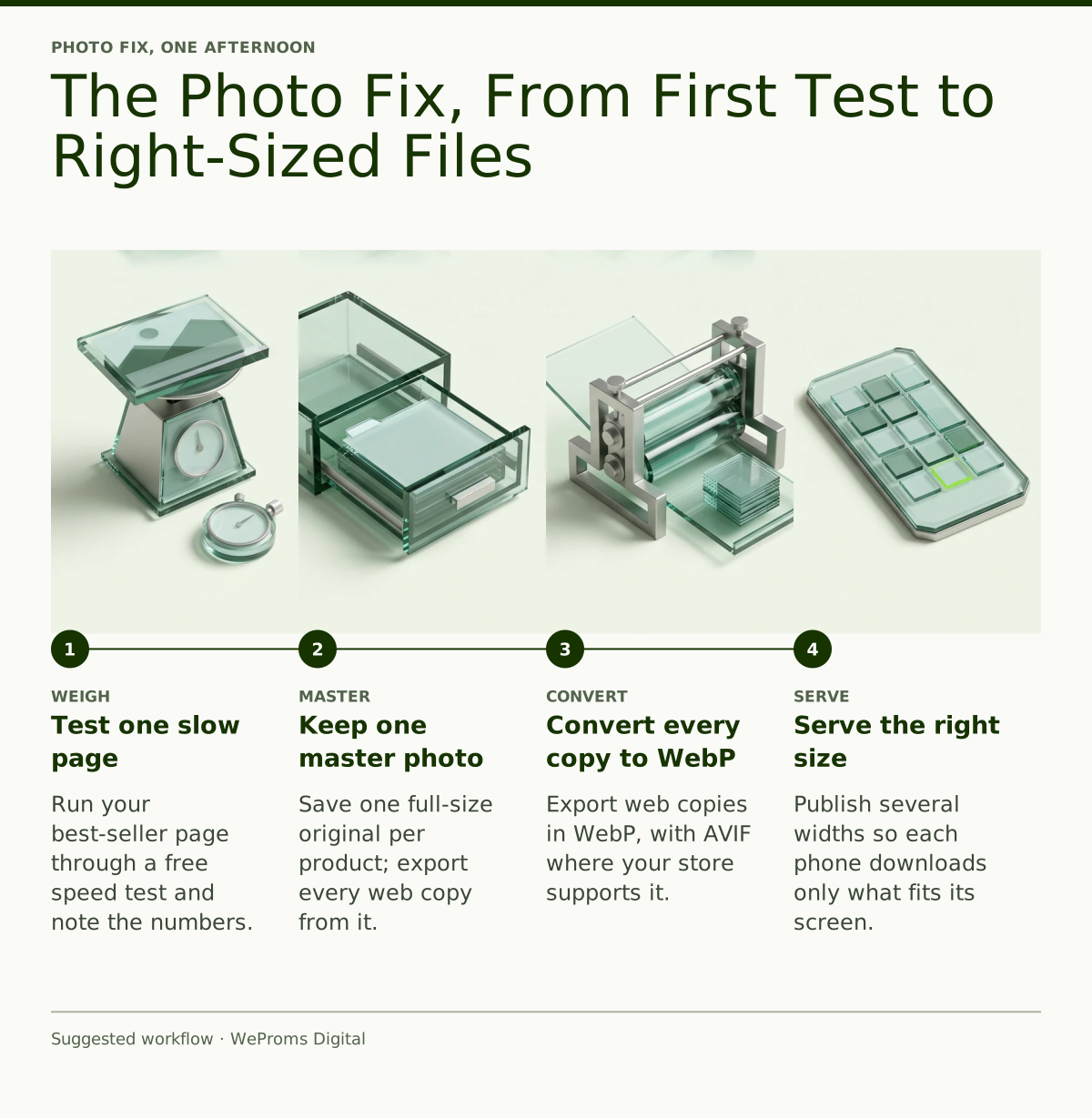
Your boutique’s website is probably not broken — it is carrying phone-camera photos that weigh five to ten times more than they need to. You can fix the worst pages in one afternoon with free tools: test one page, keep one master photo per product, convert the web copies to WebP, and let your store serve the right size to each phone.
If you run a Pakistani clothing boutique in Paterson or Edison — shaadi-season formals, abayas, everyday shalwar kameez — you already know where your customers browse: WhatsApp first, Instagram second, and your own website at the exact moment they are ready to order. That moment is where the money leaks. A $240 three-piece formal can sit behind a page that takes eight or nine seconds to open on a customer’s phone, and every one of those seconds sends her back to Instagram. More often than hosting or themes, the cause is the product photos themselves — straight off a phone camera, full size, dozens to a page.
Here is the encouraging part: photos are the cheapest thing on that list to fix. This walkthrough does the whole job in one sitting — weighing the page, keeping one master photo per product, converting to modern file formats, and letting your store serve the right size to each phone. No new camera, no paid software, no redesign.
First, weigh the page the way a phone sees it
Start here: one page, not the whole site. Open your best-selling product page in Google’s free PageSpeed Insights tool and write down two numbers — the total page weight and the LCP, which stands for Largest Contentful Paint — the moment when the biggest visible element on the page finishes appearing on screen. On a boutique product page, that element is almost always a product photo. Google’s LCP guidance counts 2.5 seconds or less, across at least 75 percent of visits, as good; anything slower than that is quietly costing you customers who never complain, they just leave.
Why start with the test rather than the fix? Because you need to know whether photos are truly the problem before you spend an afternoon on them. American internet time is now overwhelmingly mobile, as DataReportal’s Digital 2026 report on the United States documents — and a customer on an older phone on a busy family Wi-Fi downloads your page even slower than the tool’s average suggests.
SitePoint’s October guide to image optimization puts the underlying problem plainly:
“Large image files can increase page size, consume unnecessary bandwidth, and delay the appearance of important content.” — SitePoint, October 2026
Images often account for the biggest share of a page’s total download size, which means the fastest route to a faster page is almost always the photo files themselves.
Then, keep one master photo for each product
A modern phone camera produces photos around 3,000 pixels wide, weighing several megabytes each — wonderful for a family album, wrong for a web page that displays the same dress at a few hundred pixels. The discipline that fixes this is the master file: keep one high-quality master file for every product photo you own, stored in one folder on your laptop or cloud drive, and treat every version that touches the website as a disposable export made from that master.
Think of the aunt in the family WhatsApp group who sends every photo at full camera size, so everyone’s phone chokes for an hour. A website doing the same thing slows down every visitor’s phone — except visitors leave instead of complaining.
A web page never needs camera size. SitePoint’s working dimensions make a handy reference: a hero banner at roughly 1440×810 pixels, a blog illustration at 1200×675, a product thumbnail at 600×600, a small interface graphic at 320×320. Never stretch a small photo up to fill a bigger space, because upscaling adds blur, not quality. And never re-compress an already-compressed copy — always export fresh from the master.
Next, convert every web copy to WebP
File format is the second lever. WebP — an image format that stores the same photo in a substantially smaller file than classic JPEG — is supported by effectively every phone browser your customers use. AVIF — a newer format that compresses even harder — is worth adding where your platform allows it, with a JPEG copy kept as the fallback for older systems, exactly the combination SitePoint’s workflow recommends.
If you export manually, Google’s free browser tool Squoosh handles one photo at a time, and SitePoint’s suggested starting points are WebP at quality 80 and AVIF at quality 55 — then adjust after checking how each file looks and how much it weighs. For a store owner, the practical rule is simpler than the settings: the file that leaves your laptop for the website should be a WebP measured in hundreds of kilobytes, not a JPEG measured in multiple megabytes.
To see the size of the prize, compare one photo three ways (illustrative numbers — run your own master through the tools): the same product photo as a full-size phone JPEG at about 4,800 KB, a WebP export from a 1440-pixel master at about 340 KB, and an AVIF export at about 210 KB. Same dress, same clarity on a phone screen, one-fourteenth the download.
After that, let your store serve the right size to each phone
Responsive images — publishing several widths of the same photo so each visitor’s browser downloads only the size its screen actually needs — is how a modern site avoids sending a 1440-pixel file to a phone that displays it at 390 pixels wide. SitePoint’s automated workflow generates widths of 480, 768, 1080, and 1440 pixels from the single master, in both WebP and AVIF, so every screen size gets a fair file.
If your boutique runs on Shopify, much of this is built in. A CDN — a content delivery network, Shopify’s system of servers that stores and serves your images — can produce sized image variants on request through image URL parameters, as Shopify’s own performance documentation explains. The two ways owners break this system are uploading tiny masters, so large screens get blurry enlargements, and adding oversized banner images outside the normal product-image flow.
WordPress works on the same principle from the other end: it builds responsive image markup automatically from the size copies it makes at upload — which only helps when the original you upload is a clean master rather than a 6-megabyte camera dump.
At this point, fix the money pages and the banners first
Do not start alphabetically. Work in the order that carries orders: the best-seller product page, the main collection page, the homepage hero, then the checkout-adjacent pages. Campaign banners deserve the same treatment — including AI-generated ones, which SitePoint notes are becoming a common part of web publishing and which often arrive at wallpaper sizes no storefront needs. A Ramadan or Eid banner generated at full print quality can single-handedly undo an afternoon of product-photo work.
Here is what the before and after typically look like (worked example, illustrative — substitute your own numbers):
| What the customer’s phone downloads | Before the photo fix | After the photo fix |
|---|---|---|
| Heaviest product photo | ~4.8 MB straight from the camera | ~340 KB WebP from the master |
| Product page total weight | ~6 MB | ~1.1 MB |
| LCP on a mid-range phone | ~7.8 seconds | ~2.3 seconds |
| Scope of the work | — | 40 best-sellers, one afternoon |
One detail worth passing to whoever maintains your theme: the photo the customer sees first should never be set to lazy-load — delayed loading of below-the-fold images — because delaying the main photo delays the LCP itself. Shopify’s performance guidance makes the same point for storefront themes.
Once the photos are lighter, watch what changes
There is real money behind those seconds. Deloitte’s retail speed study found that a 0.1-second improvement in mobile speed lifted retail conversions by 8.4 percent and average order value by 9.2 percent — measured across large retail sites, so treat it as direction rather than a promise for a Paterson boutique. The direction is what matters: faster pages and more money per order move together.
Worked example, illustrative — substitute your own costs: your three-piece formal sells at $240; the suit, stitching, packaging, and delivery cost $95; contribution is $145 per order. If lighter pages recover even one lost order a day during the shaadi weeks, that is $1,015 a week in contribution — from photos you already own.
Lighter pages also feed Google’s image search, where “abaya online USA”-style discovery begins. Google’s image guidance tells you the same things this walkthrough does — the right format, the right size, and descriptive text around every photo. Faster pages convert better on phones, which is why WeProms pairs this work with mobile conversion optimization for diaspora-owned stores rather than treating speed as an end in itself.
From here: faster pages before shaadi season and Ramadan
The calendar rewards doing this now. Winter shaadi bookings build through November and December, and Ramadan 2027 is expected to begin around February 8, 2027, with Eid al-Fitr around March 9, 2027 — dates subject to moon sighting, as always. Fix the photo pipeline before you shoot the Eid collection, so every new photo lands right-sized from day one instead of joining a cleanup queue in February. Owners planning seasonal content on the same clock can copy the lead-time logic in our Ramadan 2027 posting calendar for a Riyadh karahi house.
When the fast pages are live, tell the family groups — with consent and an easy opt-out, ready to paste: “Assalamu alaikum! Our new shaadi formals are online, and the pages now open quickly on your phone. Browse anytime: [your link]. Reply STOP to opt out of messages.”
If you want the whole method in one place, including image dimensions for slow networks, read our one-afternoon image fix written for Pakistani stores — written for Pakistan-market stores, but the method transfers to any boutique. And if you are weighing an app instead of a better mobile site, our piece on whether a halal grocery needs a shopping app walks the same mobile-first decision.
The decision rule is simple. If your product pages pass the 2.5-second test, leave the photos alone and spend the afternoon on ads or email. If they do not, fix the photos first — because every dollar of advertising pointed at a slow page buys a stranger a reason to leave.
Read next: How Pakistani Ecommerce Stores Stop Losing Orders at Checkout and Do I Need a Shopping App for My Halal Grocery in Cologne?
WeProms Digital has worked with overseas Pakistani and halal-market retailers across the United States, Canada, the UK, and the Gulf, and speed is one of the first things we audit because it pays back fastest. Our site speed and Core Web Vitals service for overseas Pakistani businesses starts with your money pages, not the whole site. Get in touch through our contact page, email hello@weproms.com, or message WhatsApp +92 300 0133399 — we reply in US, UK, and Gulf business hours.
Frequently Asked Questions
How much does it cost to fix slow product photos?
Doing it yourself with free tools — PageSpeed Insights for testing, Squoosh for converting — costs one afternoon and nothing else. If you would rather hand it over, WeProms Digital looks at your site first and quotes speed work per store; message us on WhatsApp and we will tell you honestly whether photos are your problem before you spend anything.
Will Shopify fix my images automatically?
Partly. Shopify’s CDN generates and serves sized image variants when a well-behaved theme requests them, but it cannot rescue a banner uploaded outside the normal flow or a theme displaying a huge photo in a small slot. Upload a clean, reasonably large master, then test the page — do not assume the platform handled it.
Do I need to reshoot my product photos?
Almost never. Any phone camera from the last five years captures more detail than a web page can display; the problem is file size and format, not the shoot. Keep the originals you already have and treat them as masters.
How fast should a boutique page load on a phone?
Google’s LCP guidance says the main content should appear within 2.5 seconds for at least 75 percent of visits. Photo-heavy product pages are the hardest to keep under that line, which is exactly why the photos come first.
When should we do this before shaadi season and Ramadan?
Now, before the next collection shoot. Winter shaadi bookings run November and December; Ramadan 2027 is expected around February 8, 2027, with Eid al-Fitr around March 9, 2027, subject to moon sighting. Fixing the pipeline before the Eid shoot means every new photo arrives right-sized instead of joining a February cleanup.
Sources & References
- SitePoint — How to Optimize AI-Generated Images for Faster Websites — October 31, 2026
- web.dev (Google) — Optimize Largest Contentful Paint — current guidance
- Google Search Central — Google Images: image SEO best practices — current guidance
- Deloitte — Milliseconds Make Millions (retail mobile-speed study) — retail analysis
- Shopify Dev — Use Shopify image filters efficiently — current documentation
- Shopify Dev — Never lazy-load the LCP image — current documentation
- DataReportal — Digital 2026: The United States of America — 2026 report
Additional reading from industry feeds:
- SitePoint — How to Optimize AI-Generated Images for Faster Websites
- Ahrefs — What Is BLUF? How to Write Bottom Line Up Front — related: structuring pages so people (and AI answers) find the point fast