
By Abdul Rehman · Last updated: June 2026.
TL;DR: Pakistani ecommerce brands sending marketing and transactional emails without SPF, DKIM, and DMARC authentication risk losing orders when messages miss the inbox. This audit walks through the five deliverability fixes that protect revenue.
The revenue leak most Pakistani ecommerce brands ignore
Picture a Karachi fashion brand that built its email list to 25,000 subscribers over two years. The brand sends a weekly newsletter and automated abandoned cart emails. Open rates hover around 18%. Revenue from email campaigns accounts for roughly PKR 800,000 per quarter. The marketing team considers email a reliable channel.
What the team may not see: some emails never reach the inbox. They land in spam folders, get blocked entirely, or get filtered into low-attention tabs. Open rate is calculated against delivered emails — not every attempted send.
Pakistan’s ecommerce sector is large enough that email deliverability problems translate into meaningful revenue leakage. If email drives a material share of orders in a mature ecommerce program, even a modest deliverability gap can quietly reduce repeat purchases, abandoned-cart recovery, and lifecycle revenue.
Think of email authentication like the stamp paper and notarization system at a Pakistani legal office. Without proper stamp paper, a document carries no legal standing regardless of how well it is written. Without SPF, DKIM, and DMARC records, an email carries no sender authority regardless of how compelling the subject line. Gmail, Yahoo, and Outlook treat unauthenticated email the way a court treats an unstamped document — filed away, never acted on.
First, understand what blocks your emails from reaching inboxes
Email deliverability — the ability of an email to reach a recipient’s inbox rather than their spam folder or being blocked entirely — depends on two factors working together. The email platform manages the sending infrastructure. The sender controls the authentication records and sending practices.
Since early 2024, Google and Yahoo require bulk senders to authenticate with SPF, DKIM, and DMARC. Microsoft introduced similar requirements in May 2025. Google’s sender guidelines make authentication a baseline requirement for senders who want reliable inbox placement.
Three authentication protocols form the foundation:
-
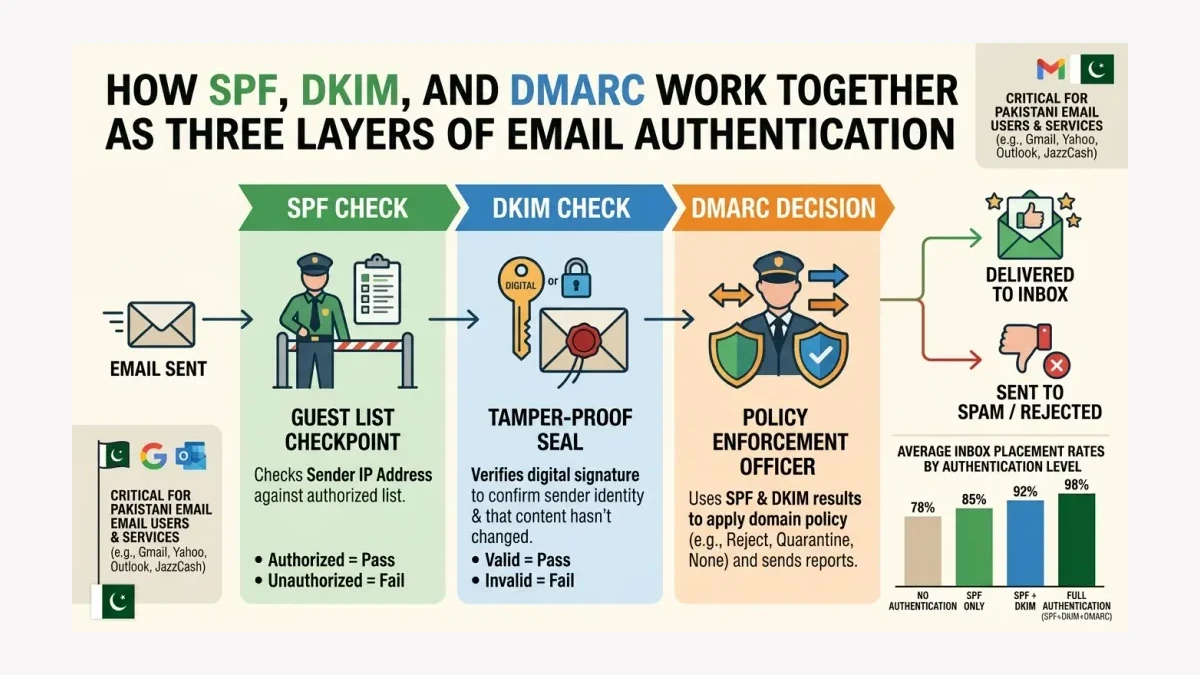
SPF (Sender Policy Framework) — a DNS record that lists which mail servers are authorized to send email on behalf of your domain. Think of it as a guest list at the door. If the sending server is not on the list, the email gets flagged.
-
DKIM (DomainKeys Identified Mail) — a cryptographic signature attached to each email that proves the message was not modified in transit. This is the digital equivalent of a tamper-proof seal on a medicine bottle.
-
DMARC (Domain-based Message Authentication, Reporting, and Conformance) — a policy that tells receiving mail servers what to do when SPF or DKIM checks fail. DMARC also sends reports showing who is sending email from your domain, including unauthorized senders attempting to impersonate your brand.
A Pakistani ecommerce brand without these three records is sending every email without credentials. The major inbox providers accept some of these messages but route an increasing share to spam as enforcement tightens.
Then, audit your current authentication status
Before making any changes, check what authentication records currently exist for your domain. This takes approximately 5 minutes.
Open a free DNS lookup tool — MXToolbox offers SPF, DKIM, and DMARC checkers at no cost. Enter your sending domain (for example, yourstore.pk).
Check three things:
SPF record. Look for a TXT record starting with v=spf1. If no SPF record exists, every email you send through a third-party platform (Klaviyo, Mailchimp, Campaign Monitor) fails the first authentication check. If an SPF record exists but does not include your email platform’s sending servers, some emails pass and others fail — creating inconsistent deliverability.
DKIM record. Look for a CNAME or TXT record in the format selector._domainkey.yourstore.pk. Most email platforms generate a unique DKIM key during setup. If this record is missing or misconfigured, Gmail and Outlook cannot verify that your emails were sent by an authorized system.
DMARC record. Look for a TXT record at _dmarc.yourstore.pk starting with v=DMARC1. If no DMARC record exists, receiving mail servers have no instruction on how to handle authentication failures — which means they apply their own judgment, often resulting in spam placement.
If all three records are missing or misconfigured, the email revenue leak is active right now. The good news: the fix is straightforward and does not require developer resources.
Next, configure SPF for your sending domain
SPF tells receiving mail servers which IP addresses and domains are authorized to send email from your domain. An SPF record lives in your domain’s DNS settings, not in your email platform.
Access your domain registrar’s DNS management panel. For Pakistani businesses, this is often a local registrar or an international provider like Namecheap, GoDaddy, or Cloudflare.
Create a new TXT record with these values:
- Host/Name:
@(or leave blank depending on registrar) - Value:
v=spf1 include:_spf.google.com include:mailgun.org include:klaviyo.com ~all - TTL: 3600 (or default)
The exact include statements depend on which platforms send email on your behalf. A typical Pakistani ecommerce brand uses 2-3 sending platforms: Google Workspace for business email, an email marketing platform like Klaviyo or Mailchimp for campaigns, and possibly a transactional email service for order confirmations.
Each platform publishes its own SPF include statement in their documentation. Include only the platforms you actually use. Adding unnecessary includes can cause SPF to exceed the 10-DNS-lookup limit, which causes authentication to fail entirely.
The ~all at the end tells receiving servers to flag (but not reject) email from unauthorized senders. Once DMARC is configured and tested, this can be tightened to -all for strict enforcement.
After that, activate DKIM signing for each sending platform
DKIM adds a cryptographic signature to every email you send. When Gmail receives an email from your domain, it looks up the public key in your DNS records and uses it to verify the signature. If the signature matches, the email passed through an authorized sender.
Most email marketing platforms generate DKIM keys automatically and provide step-by-step instructions for adding them to DNS. For Klaviyo, navigate to Account > Settings > Domains > DKIM Setup. For Google Workspace, the DKIM setup lives in the Admin Console under Apps > Google Workspace > Gmail > Authenticate Email.
The DNS record typically looks like this:
- Host/Name:
klaviyo._domainkey.yourstore.pk(the selector prefix varies by platform) - Value: A long string provided by the platform, starting with
v=DKIM1 - Record type: CNAME or TXT (platform instructions specify which)
After adding the record, wait 15-30 minutes for DNS propagation, then verify using the platform’s built-in verification tool or MXToolbox’s DKIM checker.
DKIM alignment matters. The domain in the DKIM signature must match the domain in the email’s From address. If you send from offers@yourstore.pk but the DKIM signature is for yourstore.mailchimpapp.com, the alignment check fails. Most modern platforms handle alignment automatically, but it is worth verifying.
| Authentication Layer | What It Proves | Pakistani Impact |
|---|---|---|
| SPF | Sending server is authorized | Prevents spoofing from unknown IPs |
| DKIM | Email content was not modified | Proves message integrity to Gmail/Outlook |
| DMARC | Policy for handling failures | Blocks impersonation, enables BIMI |
| BIMI (optional) | Displays a verified logo in supported inboxes | Can improve brand recognition when authentication is already strong |
Once you have SPF and DKIM in place, activate DMARC
DMARC is the enforcement layer. It uses the results of SPF and DKIM checks to make a decision about what to do with emails that fail authentication. DMARC also provides reporting — daily XML reports from Gmail, Yahoo, and Outlook showing every email that claimed to be from your domain.
Create a DMARC TXT record in DNS:
- Host/Name:
_dmarc.yourstore.pk - Value:
v=DMARC1; p=none; rua=mailto:dmarc@yourstore.pk; ruf=mailto:dmarc@yourstore.pk; pct=100; adkim=r; aspf=r - TTL: 3600
Start with p=none — this tells receiving servers to send reports but not to reject or quarantine failing emails. This monitoring phase typically lasts 2-4 weeks while you review reports and identify legitimate sending sources you may have missed.
After confirming that all legitimate sending sources pass SPF and DKIM, change the policy to p=quarantine (send failing emails to spam) and eventually p=reject (block failing emails entirely). DMARC at enforcement level (p=quarantine or p=reject) is commonly required before implementing BIMI — the protocol that displays your brand logo next to emails in supported inboxes. BIMI can improve brand recognition, but it should be treated as a trust signal rather than a guaranteed open-rate lift.
DMARC reports reveal something surprising for many Pakistani businesses: unauthorized senders using your domain. These could be former employees with access to old email systems, partner companies sending on your behalf without proper configuration, or malicious actors attempting phishing attacks. The reports show every source, legitimate or not.
The outcome: measurable revenue recovery
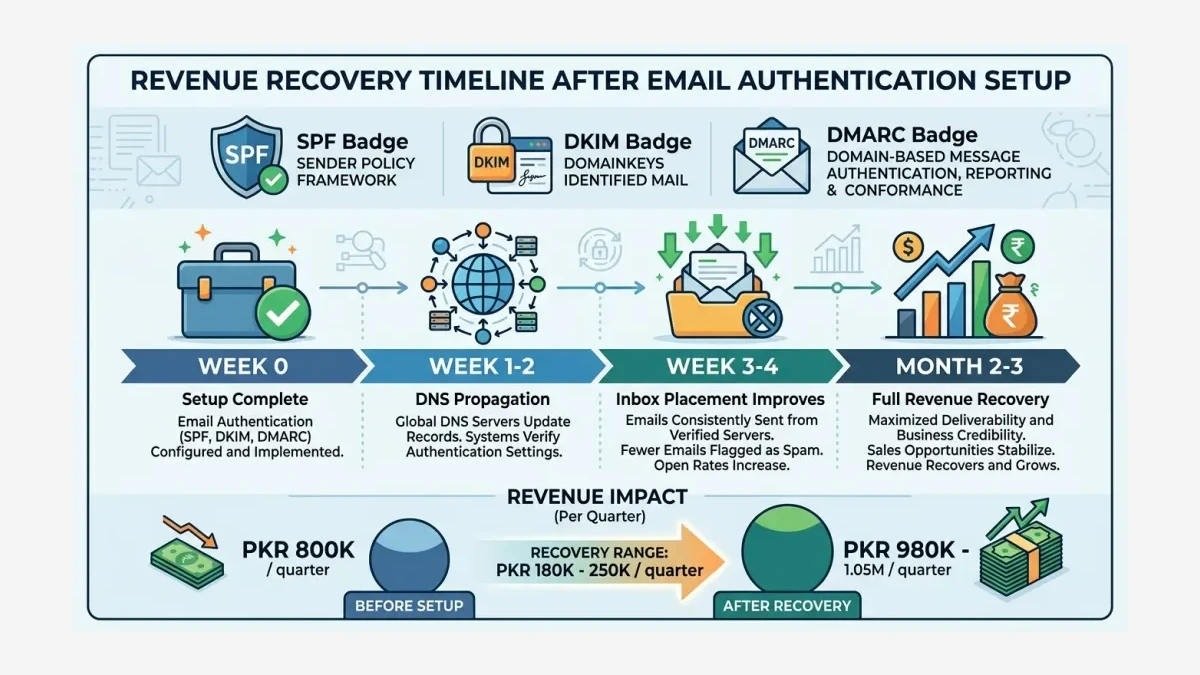
After completing the full SPF + DKIM + DMARC setup, most Pakistani ecommerce brands see deliverability improvements within 1-2 weeks as DNS changes propagate and mailbox providers process the new authentication signals.
Here is what the revenue impact looks like for a hypothetical Pakistani ecommerce store with 25,000 email subscribers:
- Before authentication: a meaningful share of emails may land in spam or be blocked, making revenue reporting look weaker than the list size suggests.
- After full authentication: more legitimate messages have a chance to reach the inbox, so teams can judge subject lines, offers, and automations from cleaner delivery data.
- Revenue recovered: PKR 180,000-250,000 per quarter, or PKR 720,000-1,000,000 annually.
Enterprise-grade deliverability infrastructure exists, but it only works for senders who have properly authenticated their domains and maintain clean sending practices.
For Pakistani brands sending transactional emails through JazzCash, Easypaisa, or direct bank integrations, the same authentication principles apply. Order confirmation emails, shipping notifications, and payment receipts all require SPF, DKIM, and DMARC to reach customer inboxes reliably. A missed payment confirmation email can result in a customer dispute, a chargeback, or a lost sale — costs far exceeding the 2 hours required to set up authentication.
The fix requires no developer, no budget increase, and no platform migration. It requires access to your domain’s DNS settings and approximately 2 hours of focused configuration. Most Pakistani SMEs can complete the full authentication setup in a single afternoon.
WeProms Digital includes deliverability auditing as part of every email marketing engagement. The team configures SPF, DKIM, and DMARC for client domains, monitors DMARC reports for unauthorized sending activity, and optimizes inbox placement rates across Gmail, Outlook, Yahoo, and Pakistani ISP mail servers.
Get in touch: hello@weproms.com · WhatsApp +92 300 0133399 · weproms.com/contact-us
Read next: Why AI Email Marketing Speed Is a Trap for Pakistani Businesses · Win Back Campaign Strategies for Pakistani Ecommerce Revenue
Frequently Asked Questions
How do I check if my Pakistani ecommerce store has SPF, DKIM, and DMARC set up?
Use a free DNS lookup tool like MXToolbox. Enter your sending domain and run the SPF checker, DKIM checker, and DMARC checker separately. If any of the three return “not found” or show errors, the authentication record is missing or misconfigured. Most Pakistani SMEs that have never intentionally configured these records will find them missing.
Will setting up DMARC block legitimate emails from my store?
Starting with p=none policy ensures no legitimate emails are blocked. The none policy monitors all email activity and sends daily reports without affecting delivery. After reviewing reports for 2-4 weeks and confirming all legitimate sources pass authentication, the policy can be escalated to quarantine and then reject with confidence.
How much does email authentication cost for a Pakistani SME?
SPF, DKIM, and DMARC records are DNS TXT records — they cost nothing to create. Domain registrars do not charge for DNS record management. The only potential cost is if a Pakistani business hires a consultant or agency to configure the records, which typically takes 1-2 hours. WeProms Digital includes this configuration at no extra charge for email marketing clients.
Can I set up email authentication myself without a developer?
Yes. The process involves logging into your domain registrar’s DNS management panel and adding 3-4 TXT or CNAME records. Most email marketing platforms provide copy-paste values for each record, along with step-by-step visual guides. No coding, server access, or terminal commands are required. The entire setup takes approximately 2 hours for all three protocols.
What about transactional emails from JazzCash or Easypaisa integrations?
Transactional emails — payment confirmations, order updates, shipping notifications — follow the same authentication rules as marketing emails. If your store sends transactional emails from its own domain (for example, orders@yourstore.pk), those emails need SPF, DKIM, and DMARC configured regardless of which payment gateway triggered them. The authentication applies to the sending domain, not the payment processor. WeProms Digital configures authentication for both marketing and transactional email flows through its email deliverability and inbox placement optimization service.