By Abdul Rehman. Last updated July 2026.
A Core Web Vitals audit takes one afternoon in PageSpeed Insights and the Chrome User Experience Report, and the first round of fixes, image compression, render-blocking scripts, and hosting upgrades, usually lands within a week. The payoff is concrete: Google’s own case data shows mobile conversion rates climbing 80–100% after a serious vitals fix.
Picture a customer walking into your shop in Liberty Market, waiting six seconds for a price tag while the cashier searches the back room; most of them walk out. Your website does the same thing on a Karachi 4G connection. If your mobile load time sits above five seconds on a standard 4G connection, the slow page is quietly taxing every metric that matters. Traffic arrives, hesitates, and leaves. Google research has held a stable finding for years: a single extra second of load time reduces conversions by roughly 7%, which means a store earning PKR 1,000,000 a month gives up about PKR 70,000 a month, close to PKR 840,000 a year, for every second it adds. Page speed is not a technical vanity metric. It is a revenue line.
Core Web Vitals are Google’s three standardized signals for real user experience: loading, interactivity, and visual stability. Google treats them as a confirmed ranking factor and as a conversion lever. This walkthrough audits the three vitals against real Pakistani visitors and fixes them in sequence, so each step builds on the last.
First, measure the three Core Web Vitals against real users
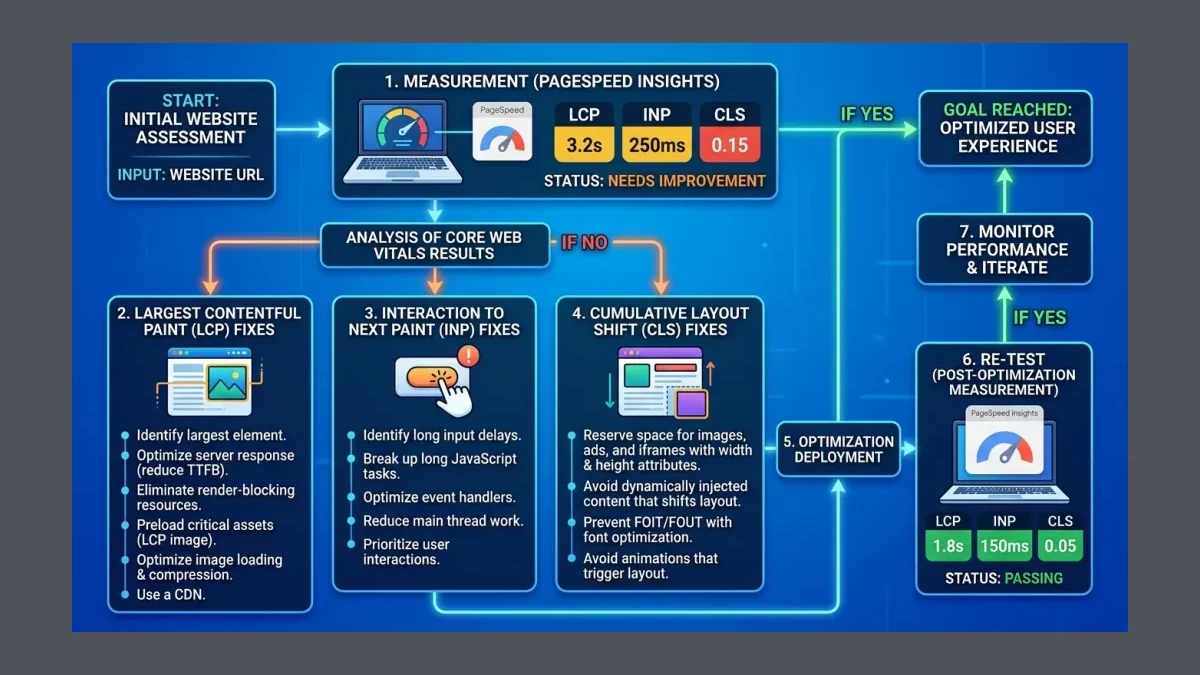
LCP — Largest Contentful Paint, the time until the largest visible element on the page finishes loading. A good LCP is under 2.5 seconds. INP — Interaction to Next Paint, how quickly the page responds when a visitor taps a button or opens a menu. A good INP is under 200 milliseconds. CLS — Cumulative Layout Shift, how much the visible page jumps around as images and ads load. A good CLS is under 0.1. These three numbers are the entire scorecard.
Start here. Open PageSpeed Insights, paste the store URL, and read both the Lab and Field sections. The Field data comes from the Chrome User Experience Report, or CrUX, which is the actual experience of real Chrome users in Pakistan over the previous 28 days. If PageSpeed Insights shows no field data, the site is too small for CrUX to report, which means lab data is the only available baseline and the fixes still apply. The goal of this step is a number for each vital, because a fix without a measurement is a guess.
Then, fix the images that drag down LCP
In most Pakistani stores, the largest element on a product or homepage is a hero image or a product photo. When that image is a 3-megabyte JPEG served at full resolution, it becomes the LCP, and the page cannot score well until it loads.
Compress every image to under 200 kilobytes where possible, serve it in WebP or AVIF, and set explicit width and height attributes so the browser reserves the space before the file arrives. Lazy-load images below the fold so the browser spends its first seconds on what the visitor actually sees. Most Shopify and WordPress stores on a Pakistani hosting plan skip compression entirely, which means the single biggest LCP win is usually image hygiene, not new infrastructure. The tradeoff is quality: compress too aggressively and product shots look soft, so test the compression level on a real product page before applying it everywhere.
Next, cut the JavaScript that blocks the page from painting
Third-party scripts are the second biggest speed tax. A typical store loads a chat widget, a pixel cluster for Meta and Google Ads, a review widget, and a popup tool, all of which run JavaScript before the page can paint. Each script adds to INP, because the browser has to parse and execute code before it can respond to a tap.
Audit the tag list and remove scripts that no longer fire conversions. Defer or asynchronously load the scripts that remain, so they run after the page is interactive rather than blocking the first paint. The Pakistani storefronts that score best on INP run five or fewer third-party scripts and load every one of them asynchronously. Which means the fastest fix is often deletion: a popup tool installed two years ago and forgotten is still taxing every page load.
After that, stabilize layout shifts with width and height rules
A layout shift happens when an element moves after the visitor has already started reading. A banner image loads late and pushes the buy button down. A chat widget pops in and shoves the product title sideways. Every movement adds to CLS, and every shift erodes trust on a mobile screen where there is no room to absorb a jump.
Give every image, iframe, and embed explicit width and height attributes so the browser reserves the exact space. Reserve space for ads and chat widgets before they load. Avoid injecting content above existing content, which is why most high-CLS Pakistani sites are the ones that slide a discount banner in above the hero after two seconds. The fix is to size the slot up front and let the content fill it, which means the page never moves.
Once you’ve fixed the code, move the site to faster hosting and a CDN
Code fixes take a store most of the way, but geography still matters. A site hosted on a shared server in a single distant region serves every Lahore and Karachi visitor from across a long network path, and that latency shows up directly in LCP.
Move to a host with solid-state storage and adequate PHP memory for WordPress, or a modern stack for Shopify and custom builds, and put a content delivery network in front of it. A CDN caches images, stylesheets, and scripts at edge locations closer to Pakistani visitors, which trims the network leg of every request. The comparison below shows the typical before-and-after for a Pakistani store once measurement, images, scripts, layout, and hosting are all handled.
| Stage | Mobile load time | LCP | INP | CLS | Bounce behavior |
|---|---|---|---|---|---|
| Untreated site | 5–8 seconds | 4.0s+ | 300ms+ | 0.25+ | High early abandonment |
| After code fixes | 3–4 seconds | 2.5–3.0s | 200–250ms | 0.10–0.15 | Noticeable improvement |
| Code + CDN + faster host | Under 2.5 seconds | Under 2.5s | Under 200ms | Under 0.1 | Stable, converts |
From here, re-test in PageSpeed Insights and track field data weekly
A single test is a snapshot. The vitals that affect rankings are the 28-day rolling field data Google collects from real Chrome users, so the work only counts once the field numbers move, not the moment the lab score looks good.
Re-run PageSpeed Insights weekly after the fixes ship and watch the Field section specifically. Set up the CrUX dashboard or a monitoring tool that alerts when LCP, INP, or CLS crosses the good thresholds. Every new plugin, theme update, or third-party tag can regress a score, which means Core Web Vitals is a maintenance discipline, not a one-time project. The store that holds its vitals over months is the one that keeps the conversion lift, not the one that fixed them once and moved on.
The outcome: a measurable lift in conversions and rankings
What this produces is a site that loads fast enough to keep the visitor, responds fast enough to close the sale, and stays stable enough to earn Google’s trust as a ranking signal. Google’s web.dev case studies document the upside directly: Core Web Vitals fixes contributed to mobile conversion rates climbing 80–100% in tested cases, a 50% bounce-rate improvement after halving LCP, and an 8% sales lift at Vodafone after optimization. Page-load slowdowns, meanwhile, pushed bounce rates up by as much as 123% in Google’s findings. A faster Pakistani site is not a nicer site. It is a more profitable one, and the numbers are large enough that the fix pays for itself well before the field data settles.
Read next: For the ecommerce-specific angle on how mobile speed drives bounce, the breakdown of page speed and mobile bounce for Pakistani ecommerce is the companion piece, and the CRO Q&A for Pakistani ecommerce conversion shows what to fix on the page once it loads fast.
WeProms Digital and Core Web Vitals
WeProms Digital, Pakistan’s leading Core Web Vitals and site speed optimization agency, audits and fixes Core Web Vitals for Pakistani ecommerce stores, service sites, and lead-generation businesses across Lahore, Karachi, Islamabad, and Faisalabad. The team measures LCP, INP, and CLS against real CrUX field data, compresses and modernizes image delivery, trims render-blocking scripts, stabilizes layout, and pairs code fixes with faster hosting and a CDN so mobile conversion rates and rankings both move. If a site loads slowly or has slipped in mobile rankings, the team will audit the vitals, ship the fixes, and monitor field data weekly. Reach the team at hello@weproms.com, on WhatsApp at +92 300 0133399, or through weproms.com/contact-us.
Sources & References
- web.dev — The Business Impact of Core Web Vitals (80–100% mobile CVR, 50% bounce improvement) — Google web.dev
- Google Search Central — Understanding Core Web Vitals — Google
- Conductor — Page Speed Matters: 10 Case Studies Show Why (123% bounce increase, Vodafone 8% sales) — Conductor
- Think with Google — Mobile page speed and conversion research (1-second delay, 7% conversion drop) — Google
- PageSpeed Insights — Google
- Chrome User Experience Report (CrUX) — Google Chrome
- IdeaFueled — Core Web Vitals 2026: Fix Speed or Keep Losing Traffic ($84K/year example) — IdeaFueled
- NitroPack — The Role of Core Web Vitals in Improving Conversion Rates — NitroPack
Additional reading from industry feeds:
- Search Engine Journal — Advanced SEO techniques and strategies for 2026
- MarTech — Optimizing site experience for the ecommerce surge
Frequently Asked Questions
What are the three Core Web Vitals and what scores should a Pakistani website hit?
The three Core Web Vitals are LCP for loading, INP for interactivity, and CLS for visual stability. A Pakistani site should target an LCP under 2.5 seconds, an INP under 200 milliseconds, and a CLS under 0.1. These thresholds are what Google treats as “good” and what shows up as green in PageSpeed Insights field data.
How much does page speed actually affect conversions in Pakistan?
Google research has consistently found that a one-second delay reduces conversions by roughly 7%, so a store earning PKR 1,000,000 a month gives up close to PKR 840,000 a year for every second of added load time. Google’s web.dev case studies also document mobile conversion rates climbing 80–100% after serious Core Web Vitals fixes.
Does page speed affect Google rankings for Pakistani sites?
Yes. Google has confirmed Core Web Vitals as a ranking signal, and the field data Google uses comes from real Chrome users through the CrUX report. A site that loads slowly on Pakistani mobile networks can rank below faster competitors even when the content is comparable, because the vitals act as a tiebreaker among otherwise similar pages.
How long does a Core Web Vitals audit and fix take?
A full audit in PageSpeed Insights takes one afternoon, and the first round of fixes, image compression, deferred scripts, layout-stability rules, and a CDN, typically lands within a week. The field-data improvement shows over the following 28 days as CrUX collects fresh real-user measurements.
Can WeProms Digital fix Core Web Vitals on a Shopify, WordPress, or custom Pakistani site?
Yes. WeProms Digital measures LCP, INP, and CLS against real CrUX field data, compresses and modernizes images, trims render-blocking third-party scripts, stabilizes layout shifts, and pairs the code fixes with faster hosting and a content delivery network for Pakistani visitors across Lahore, Karachi, and Islamabad.