
By Abdul Rehman · WeProms Digital · October 20, 2026
Last updated: October 2026.
Give the AI read access to everything, write access to almost nothing, and final approval on anything public. Lock five identity fields — name, address, phone, primary category, website — let posts land as drafts, and keep review replies human. Setup takes about an hour; ongoing care runs from an illustrative 25 OMR a month.
If you run a Pakistani restaurant in Ruwi — biryani on the pass, karak tea in the urn, Talabat tablets pinging through the evening — someone has already offered to let an AI assistant run your Google listing for around 25 OMR a month. The offer is not a scam. The tools are real, they are getting cheaper, and some of what they do genuinely helps a busy kitchen. The catch is what they are allowed to touch.
This walkthrough builds the safer version of that offer, step by step: what to connect, what to lock, what to check every week, and how to tell whether the monthly fee is paying for itself. It is written for a single-location restaurant where a manager or a senior family member can spare ten minutes a week on a draft queue. A one-person operation with no manager should keep the tool to read-only reports and keep every edit manual — the checkpoint steps below assume someone can stand at the checkpoint.
First, find out what the AI can actually touch
Start here.
These tools connect the way a staff login connects. The AI does not take your Google password; you sign in through Google yourself and approve the tool, the same way you approved WhatsApp Business or your Talabat tablet. Commercial listings tools of this kind split their permissions — the server described by listings platform Pluspoint exposes 26 tools, of which 15 only read data and 11 can write changes. Access tokens expire after roughly an hour, and revoking the connection in settings cuts it off within that window. Underneath it all, Google requires projects to be approved for Business Profile API access before any tool can call it — the API documentation describes that gate, which is one reason most restaurants meet these tools through a vendor rather than directly.
Ask the vendor one question in writing before you pay anything: which of your tools write to my listing, and which fields can they change? A serious provider answers with a list. A vague answer about “full automation” is your cue to slow down, because the vague ones are describing exactly the access this walkthrough is designed to remove.
One limit shapes everything else: access is granted per Google account, not per location. That is fine in Ruwi, where you run one restaurant. A family running two branches off a single account shares one blast radius, which means the checkpoints later in this walkthrough are not optional for them.
Then, lock the five fields that identify your restaurant
Five fields are the identity of the business on Google: the name, the address, the phone number, the primary category, and the website. Every one of them should wait for a human, on every platform that offers a confirmation queue. The reason is not caution for its own sake. Directories, map apps, and AI assistants copy the source record rather than checking with you — Pluspoint’s audit of ChatGPT’s business cards found 45 of 56 carried a Yelp URL tagged as an OpenAI data feed, not anything those businesses had published themselves. Fix a wrong phone number later and you are chasing it across every copy, several of which you cannot edit at all.
“An agent that can write a holiday post for one café can also change the phone number on forty of them in a single prompt.” — Pluspoint, DEV Community
Google adds its own friction, and that friction works in your favor. Google’s guidance on editing a Business Profile says edits are reviewed before they appear, moving to a new address requires re-verification, and a name change can trigger the same review. During review, a listing can look inconsistent to customers in the exact week you needed it stable — which is why casual bulk edits made by an agent at two in the morning are a bad trade for a restaurant that lives on Friday-prayer rush traffic and family bookings. Google also edits listings on its own sometimes; the piece on stopping Google from changing your business listing is written for Pakistan-market listings, but the controls transfer to Ruwi unchanged.
Back home in Karachi, the family sweet shop on Tariq Road lets the youngest employee post offers on the shop’s WhatsApp status, but only the owner changes the bank details printed on the order slips. Nobody calls that distrust; everybody calls it sense. Treat your Google listing the same way — the AI may speak for the shop, but only you may change who the shop is.
| What | Who can change it | Where it waits | Why |
|---|---|---|---|
| Identity fields (name, address, phone, primary category, website) | A person only | Confirmation queue | Errors spread to every directory copy; re-verification can follow |
| Routine fields (hours, description, services, menu links) | The AI, with every change logged | Live immediately | Wrong values are noticed fast and revert in seconds |
| Posts and offers | The AI drafts, a person approves | Content calendar | One broken placeholder can fan out across every post |
| Review replies | The AI drafts, a person sends | App approval | Replies stay public for years |
| The connection itself | You, revocable | Account settings | Short-lived tokens keep the blast radius small |
Print that table or screenshot it. When a vendor’s onboarding screen shows you a permissions list, line it up against the left column, and anything in the first row being granted to the machine is your signal to renegotiate before continuing.
Next, automate the fields that fix themselves
Regular opening hours, the description, the services list, and menu links sit at the opposite end of the risk scale. A wrong value gets noticed within a day and reverted in seconds, so an agent can change them — provided every single change lands in a log you can actually open. Ask where that log lives and how long entries persist, because a log nobody can find is functionally the same as no log.
The practical split for a Ruwi kitchen: let the tool keep the weekly hours accurate, keep the services and popular-dishes list current, and keep the menu link pointing at the live Talabat or WhatsApp ordering page. That covers the boring majority of listing maintenance, and it costs nobody an evening. It also frees your ten weekly minutes for the two rows of the table that genuinely need a human eye.
After that, set every post to draft, not live
Posts are where agents shine and where they embarrass you. A prompt like “write a post about the weekend biryani deal and schedule it” should produce a draft in a calendar, not a live post — because placeholders travel. The same tooling that fills a city name correctly for forty locations can fill it with the raw placeholder for forty posts when a template breaks, and one wrong slot fans out everywhere at once.
Season timing is the version that actually costs money. Ramadan is expected to begin around 8 February 2027, subject to moon sighting, and every year some Gulf restaurants lose a week of orders because the listing still shows lunch hours — a Kuwait mandi restaurant’s wrong Ramadan hours made exactly this mistake on Google. Set special hours inside the app yourself, two to three weeks before the expected date, rather than asking the agent to infer them; then let the tool verify what you set, never the reverse.
The review step costs a minute. The agent did the writing and the scheduling; a person scans the calendar on Sunday night and approves, edits, or deletes. That minute is the cheapest quality control in your entire marketing budget.
At this point, keep review replies human
A reply sits under a customer’s review for years, and future customers judge you by it. A cheerful template pasted under a complaint about a late order is a screenshot waiting to travel through the Ruwi WhatsApp groups — and in a community where half your customers know each other, screenshots travel faster than any advertisement. Google’s own guidance on replying to reviews applies to both praise and complaints, which is precisely the judgment a template lacks.
The reads still help enormously, done the right way round. Search Engine Journal’s October 2026 webinar recap applies the same read-first split to phone calls. For reviews, Pluspoint’s guide is blunt: let the agent find the reviews that need attention and tag what customers mention — wait times, order accuracy, freshness — then let a person answer. The webinar recap flags a wrinkle worth knowing early: calls made to your business by AI assistants are their own signal, checking hours or availability on someone’s behalf, and they should be tagged differently from a customer’s own call rather than counted as sales leads. Handled well, the read-and-reply loop feeds the same repeat-business habit that stops Muscat catering clients vanishing after one booking — one more reason the follow-up belongs to a person who can actually make it happen.
One message belongs in your own WhatsApp, not the agent’s. Send it only to customers who agreed to hear from you — Oman’s Personal Data Protection Law applies to processing personal data in Oman with no small-business exemption — and keep the opt-out visible:
“Assalam-o-Alaikum [name], thank you for ordering from [restaurant] tonight. If everything arrived on time and correct, a one-line Google review helps our small shop: [review link]. We only message customers who chose to hear from us — reply STOP and we will not message again.”
Once the reads are flowing, put them to work
The fee earns its keep at this stage. Google’s own research on local search — Think with Google’s mobile-search study — found that 76% of people who search on a smartphone for something nearby visit a business within a day, and 28% of those searches end in a purchase. Your listing is not a brochure; it is the front door most of Muscat walks through before they ever see your dining room. Neither number proves anything about a specific night-out market in Ruwi — they describe search behavior everywhere, then stop. Your evidence is local: direction requests and calls moving after the listing is fixed.
A tool that reads your profile can answer, in seconds, the questions that used to take a spreadsheet afternoon: which weeks did one- and two-star reviews cluster, what did those customers actually mention, and which scheduled posts failed to publish. Three questions, one prompt, and the answers point you at the one problem worth your Sunday rather than the twenty that are fine.
Worked example — substitute your own costs. Say the average order at your counter is 4.2 OMR and contributes about 1.6 OMR after food cost, packaging, and bags. A phone number that quietly went stale and costs you twelve calls a week is roughly fifty lost orders a month, or 80 OMR of contribution — more than triple the 25 OMR monthly fee. Read the other way, the setup pays for itself the moment it prevents about sixteen lost orders a month (16 x 1.6 = 25.6), which is one saved order every two days. The bar chart with this article sets those figures beside a typical full-agency retainer of around 60 OMR (both illustrative figures), and a listing tool that nobody audits is exactly the kind of quiet subscription WordStream’s budget-leak checklist warns about.
Measure the numbers that move after handover: direction requests and calls in your profile insights. Publishing is an activity; requests are a pulse.
The outcome: updates in minutes, with a checkpoint
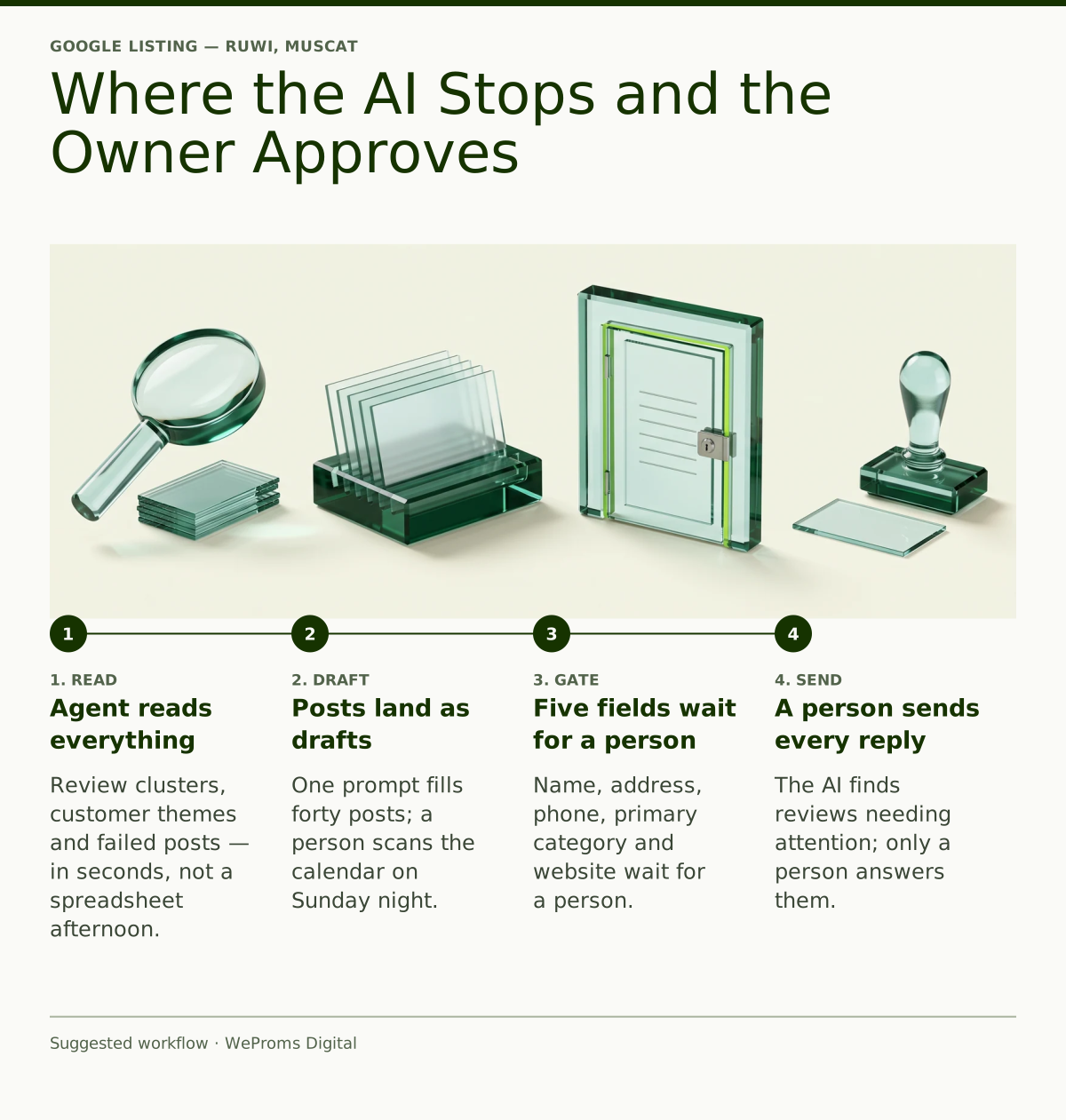
Done properly, the arrangement looks like this. The AI reads everything, drafts everything, and publishes almost nothing. Your listing updates in minutes during wedding-season rushes and Ramadan hour changes instead of waiting for a free evening that never comes. Your reviews get answered by a person who knows the difference between a bad night and a bad customer. And your monthly cost sits at tool-plus-oversight money rather than retainer money, with every change traceable to a log line.
One principle closes the walkthrough. For a single-location restaurant, an AI agent with write access to all five identity fields buys minutes and risks weeks, because the rare failure — a corrupted phone number propagating through every directory copy — costs more than a year of the labor it saves. If a vendor’s pitch begins with everything automated, ask for reads-plus-drafts instead; anyone who has actually cleaned up a corrupted listing will not argue with you.
Read next: Why does Google show wrong Ramadan hours for restaurants? · How do I get more referrals for my Muscat catering business?
WeProms Digital sets up and manages Google Business Profiles for restaurants, grocers, and service businesses across Muscat, the wider Gulf, and the UK, and our local SEO and Google Business Profile work is built around exactly this checkpoint discipline — we have handled listing hygiene for single-location family businesses across multiple markets, including review recovery and reputation care when automated edits go wrong. If you want a second pair of eyes before granting an AI tool access to your listing, message hello@weproms.com, WhatsApp +92 300 0133399, or write through weproms.com/contact-us; we reply in Gulf business hours.
Frequently Asked Questions
Does the AI tool need my Google password?
No. Reputable tools use Google’s own sign-in, where you approve access through your account and the tool never sees the password. Tokens are short-lived — about an hour in the servers described publicly — and you can revoke the connection from settings at any time, cutting access off within the hour. If a vendor asks for your password directly, stop the conversation there; that request alone disqualifies them.
Will Google suspend my listing if an AI edits it?
Not for ordinary edits. Google reviews most changes before they go live, and an address change requires re-verification while a name change can trigger review too. The realistic risk is not suspension but a listing that looks inconsistent during a review window — stale hours, a pending phone number — right when wedding-season or Ramadan traffic peaks. Keeping the five identity fields human removes nearly all of that exposure.
Can the AI handle my Ramadan and Eid hours?
It can verify them, but you should set them. Ramadan is expected to begin around 8 February 2027, subject to moon sighting, and Eid al-Fitr follows about a month later. Enter special hours yourself in the app two to three weeks ahead of each expected date, then have the tool check that the published hours match what you entered. Agents inferring holiday hours from old patterns are exactly how restaurants end up showing lunch service during fasting hours.
What should listing management cost in Muscat?
For a single-location restaurant, AI-assisted listing care with human oversight typically runs around 25 OMR a month, while full agency management of the profile, posts, and review replies runs up to about 60 OMR — both illustrative figures, so treat them as planning ranges rather than quotes. The honest test is contribution math: at 1.6 OMR per average order, any option that prevents more than sixteen lost orders a month has paid for itself. WeProms Digital quotes Gulf listing work directly — message hello@weproms.com or WhatsApp +92 300 0133399 for a figure tied to your actual menu.
What customer data can I safely give the tool?
Only data you hold lawfully and can explain. Oman’s Personal Data Protection Law covers businesses processing personal data of people in Oman, with no general small-business exemption, so review data, phone numbers, and WhatsApp contact lists all count. Keep the AI’s access to information already inside your Google profile, collect reviews through requests customers opted into, and keep an opt-out visible in every message you send.
Sources & References
- DEV Community / Pluspoint — What to let an AI agent change on a Google Business Profile, and what to gate — October 20, 2026
- Google Business Profile Help — Edit your Business Profile — official documentation
- Think with Google — How Mobile Search Connects Consumers to Stores — research report
- Al Tamimi & Company — From Local Compliance to Global Reach: Oman’s Bold New Data Protection Law — 2026
- Search Engine Journal — A New Place To Look: Where Your Next AI Citations & Clicks Come From — October 20, 2026
- Google Business Profile Help — Reply to reviews — official documentation
- Google Developers — Business Profile API — official documentation
Additional reading from industry feeds:
- WordStream — 9 Overlooked Marketing Budget Leaks (+How to Plug Them) — October 19, 2026