By Abdul Rehman · September 7, 2026 · 8 min read
A “deceptive site ahead” or “this site may be hacked” warning means Google has found dangerous or spam content on your website, and every visitor is now being told to stay away. You can clean the site, request a review, and get the warning lifted in days to weeks. This walkthrough covers each step, plus the maintenance habits that stop it happening twice.
Picture this: you run a dental clinic in Faisalabad, and your website — the one that cost PKR 150,000 to build and has quietly brought in patients for three years — now greets every visitor with a red full-screen warning. Patients call to ask if you shut down. Google has effectively closed your shop, and nobody at the hosting company’s live chat feels accountable. The site never broke; it got infected, which means the fix is a cleanup and a review request, not a rebuild.
Start here: the warning is not the disease, it is the diagnosis. Google found something — injected spam links, a redirect to a phishing page, or malware downloads — and flagged it so browsers can protect users. Your job is to find what Google found, remove it, close the way it got in, and then ask Google to look again. Each step below builds on the previous one, and skipping steps is how sites get reinfected within a month.
First, confirm what Google actually found
Begin with Google’s own free reporting rather than guesswork. The Security Issues report — the section inside Google Search Console that lists detected hacks, malware, and harmful downloads on your site — names the exact problem category: injected spam, injected content, sneaky redirects, or harmful downloads. If you have not verified your site in Search Console, that verification is the true first step, and it costs nothing but an hour.
Run two more free checks alongside it. Google’s Safe Browsing site status tool shows whether the browser-level flag is active for your domain, and Sucuri’s SiteCheck scanner scans your public pages for known malware signatures and blacklisting. Together, these three checks tell you what was found, where it lives, and how bad it looks to the outside world — which means you now have a scope of work instead of a panic.
Then, contain the damage before you clean
Resist the urge to delete everything immediately. Deleting the site destroys the evidence needed to find the entry point, and it often removes the only clean backup you had. Instead, take a full snapshot of the site as it stands — files plus database — and store it outside the hosting account, because a snapshot lets your developer compare infected files against known-good versions later.
Next, put the site into maintenance mode or password-protect the root directory through your hosting control panel, most commonly cPanel at Pakistani shared hosts. Containment feels drastic; it protects visitors, stops Google from crawling more infected pages, and gives your cleanup a stable surface. If orders are still flowing through a WooCommerce store in Lahore, coordinate the downtime window for 2 a.m. rather than prime evening browsing hours, which means you lose a quiet night of sales instead of a busy one.
Tell your host what happened, in writing. Shared hosting neighbors get infected through the same server-level holes, and reputable hosts will sometimes clean server-side issues or restore from their own backups — a question worth asking before you pay anyone for emergency work.
Next, find the door the attacker used
Book a free strategy call - we'll audit your current setup and identify the highest-impact fixes.
Cleanup without finding the entry point is painting over damp. The infection came from somewhere specific, and unless that door is closed, the same attacker — or an automated bot — walks back in. The evidence in your snapshot usually points to one of three doors: an outdated plugin, a compromised password, or a nulled plugin — a pirated copy of a premium plugin downloaded free from a third-party site, which frequently ships with malicious code baked in.
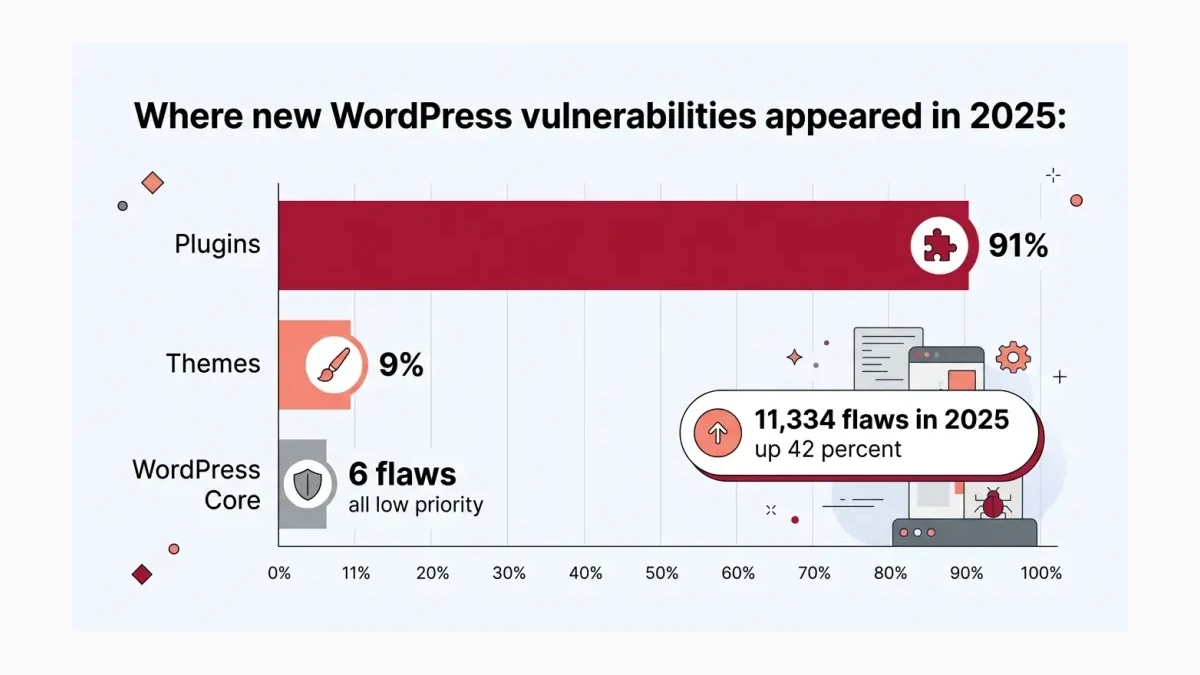
The numbers explain why plugins are the prime suspect. WordPress powered roughly 4 in 10 of all websites globally according to W3Techs’ long-running tracking, which makes it the world’s most attractive target, and Patchstack’s State of WordPress Security in 2026 counted 11,334 new WordPress ecosystem vulnerabilities disclosed in 2025 — a 42 percent jump over 2024. Of those, 91 percent were in plugins and 9 percent in themes, with only 6 in WordPress core itself, all rated low priority.
Speed is the second reason the door matters. Patchstack’s same report put the weighted median time from disclosure to active exploitation of heavily targeted vulnerabilities at just five hours, which means an unpatched popular plugin is a door that locks itself only if someone updates it promptly. Pakistani sites on PKR 4,000-a-month shared hosting rarely have that someone — and an unmaintained site is not a question of if, but of when.
After that, clean the site and close every hole
With the entry point identified, the cleanup follows a fixed sequence: remove the injected files and database rows the scanners flagged, update WordPress core and every plugin and theme to current versions, delete plugins that are abandoned or whose vulnerabilities remain unpatched, and reset every password — hosting, FTP, database, and admin — from a clean computer. Check the users table in the database for administrator accounts nobody recognizes, because attackers routinely leave themselves a backdoor — a hidden way back in, such as a rogue admin account or an uploaded script — specifically to survive exactly this cleanup.
Replace every nulled theme or plugin with a licensed copy before going live again. The pirated version saved perhaps PKR 8,000 on a theme license and cost the business its entire online presence; the licensed copy also receives security updates, which means the same door stays closed permanently. If that arithmetic feels uncomfortable, it should — it is the entire business case for maintenance, compressed into one sentence.
Once the site is clean, request a review from Google
Cleaning the files is half the recovery; the warning lifts only after Google re-checks the site. Return to the Security Issues report in Search Console, confirm every listed issue shows as fixed, and select Request Review. Google asks you to explain what the problem was, what you did to fix it, and how you verified the outcome — a short, honest paragraph is enough, and attempting to game the review with a partial cleanup fails, because Google re-scans the entire site rather than taking your word.
Timeline expectations matter for planning. Google’s official guidance says most reviews complete within several days to weeks, with confirmation emails at both receipt and completion; third-party WordPress security guides commonly report straightforward malware cases clearing in one to three days, but treat that as the optimistic case rather than a promise. Traffic does not fully return the moment the warning lifts — the Safe Browsing status updates on its own schedule — so plan for roughly a week of depressed visits even after a perfect review, and warn whoever watches the revenue dashboard.
From here, decide who keeps the site healthy
How we helped a Pakistani business achieve measurable results.
The warning lifted, you now face the decision that actually prevents round two. Three operating models exist, and the differences are starker than their prices suggest:
| Model | What it covers | What it costs a Pakistani SME | Honest failure mode |
|---|---|---|---|
| DIY by the owner | Occasional update clicks when remembered | Nearly free, plus your evenings | Updates get skipped in busy months; the site gets hacked again exactly when business peaks |
| Freelancer on call | Fixes when something breaks | Per-incident fees, often PKR 15,000-50,000 per emergency | Reactive by design; you pay crisis rates and lose sales during downtime |
| Managed maintenance retainer | Monthly updates, backups, monitoring, malware scanning, small fixes | A predictable monthly fee, typically from a few thousand PKR upward | Only fails if the provider is sloppy — so check what monitoring they actually run |
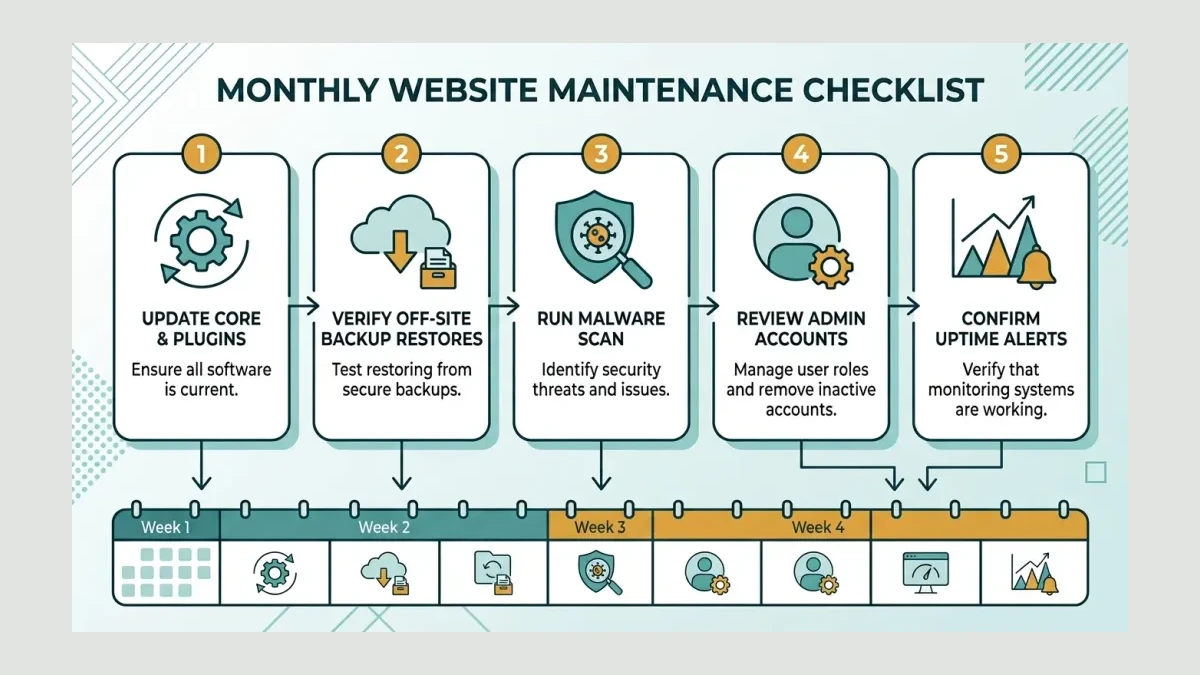
Whichever model you choose, the monthly rhythm is the same: update core, plugins, and themes within days of release; verify an off-site backup actually restores; run a malware scan; review admin accounts; and confirm uptime monitoring would alert you within minutes, not days. WeProms Digital, Pakistan’s leading website maintenance and support agency, runs exactly this rhythm for Pakistani business sites, and our pricing page publishes the retainer ranges openly so you can compare against the cost of one lost week.
The outcome: a site that stays clean
Done in order, this walkthrough produces a specific result: the red screen is gone, Google’s index shows your pages without warnings, and — the part most cleanups skip — the entry point that caused the infection is permanently closed. Sites recovered this way stay clean; sites where someone merely deleted the visible spam usually reappear on the blacklist within weeks, because the backdoor was never found.
The broader lesson for every Pakistani business with a WordPress site is proportion: security failures are overwhelmingly maintenance failures, not sophistication failures. A clinic site in Faisalabad, an exporter’s catalog in Karachi, and a store in Lahore all get attacked by the same automated bots scanning for outdated plugins, and all three are protected by the same unglamorous monthly routine. If your site currently shows a hacked warning, talk to us — we will scope the cleanup, close the entry point, and put the maintenance in place so the conversation never repeats.
Read next: Why did my website disappear from Google? and The Pakistan 4G image speed fix.
At WeProms Digital, we clean hacked WordPress sites and then keep them clean through managed maintenance — updates, off-site backups, malware monitoring, and uptime alerts, handled by our website maintenance and technical support team. If Google is currently telling your customers your site is dangerous, email hello@weproms.com or message WhatsApp +92 300 0133399, and we will start the containment the same day.
Frequently Asked Questions
How much does it cost to clean a hacked website in Pakistan?
Emergency cleanup pricing in Pakistan typically depends on site size and infection depth — a small brochure site with injected spam costs far less to clean than an infected WooCommerce store with a customer database. Most professional cleanups are quoted after a scan, and a managed maintenance retainer afterward usually costs a fraction of one emergency. WeProms Digital quotes cleanups and retainers openly after a free initial scan.
How long does Google take to remove the hacked warning?
Google’s official guidance says security reviews usually take several days to weeks, though straightforward malware cases are widely reported as clearing in one to three days. The review clock starts only after every listed issue is actually fixed and you submit the request through Search Console. Plan for about a week of reduced traffic even after the warning lifts.
Can I clean the hacked site myself?
You can, if you are comfortable with file managers, database tables, and comparing suspicious code — the core work is deleting injected files, updating everything, and resetting every credential. The risk is missing the backdoor, which is how sites get reinfected within weeks. If you do it yourself, still take a full snapshot first and verify the cleanup with an external scanner before requesting review.
Will my Google rankings recover after the cleanup?
Rankings usually return once the warning is lifted and the site is re-crawled, because the security flag suppressed rather than removed your pages. Recovery is slower for sites that stayed infected for months or lost traffic patterns meanwhile. If rankings do not bounce back within a few weeks, the cause is usually a separate issue — our guide on websites disappearing from Google covers the other culprits.
Why would hackers target my small Pakistani business website?
Almost certainly nobody targeted you personally. Automated bots scan the entire internet for outdated WordPress plugins and weak passwords, and Pakistani small-business sites are attractive precisely because so many are built once and never maintained. Your site is valuable as a spam host, a phishing page, or a doorway to visitors’ devices — which is why even a clinic or furniture shop with modest traffic gets hit.
Sources & References
- Google Search Console Help — Security Issues report — official documentation
- Patchstack — State of WordPress Security in 2026 — 2026
- Patchstack — 2025 Mid-Year Vulnerability Report — 2025
- Patchstack — WordPress Vulnerability Statistics 2025 — 2025
- W3Techs — Usage statistics of WordPress — continuously updated
- Google Transparency Report — Safe Browsing Site Status — official tool
- Sucuri — SiteCheck Malware Scanner — official tool