
Picture a Lahore fashion brand investing in Google Ads. Its GA4 dashboard reports fewer purchases than Shopify shows in its order log. That gap deserves investigation, but it does not automatically prove lost tracking: order status, reporting dates and attribution settings can also explain differences.
For Pakistani ecommerce stores, the practical challenge is connecting website activity with payment and delivery outcomes. Installing GA4 starts collection; it does not establish whether your purchase data is complete or whether Google Ads uses the right outcome for bidding.
Start here: understand what key events measure, identify where your setup breaks, and compare the same business outcome across systems before changing tags.
GA4 key events are interactions you identify as important to your business. Google Ads conversions can be created from those events. The distinction matters: marking an event as important in Analytics does not, by itself, make it the purchase goal your campaigns optimise towards.
What exactly are GA4 key events?
GA4 records interactions as events, including page views, clicks and purchases. Key events highlight business-critical actions, as Google’s documentation explains. Crucially, purchase is marked as a key event by default. Your job is to ensure it actually fires with accurate transaction data.
Enhanced measurement is a separate feature. Enabling it does not implement your store’s ecommerce event chain. A store integration, Google Tag Manager implementation or custom code must send the relevant shopping events and parameters.
Google also allows you to create an Ads conversion from an ordinary Analytics event; the process automatically marks that event as a key event. Check collection, key-event status and Ads conversion configuration separately during a GA4 setup review.
Why Pakistani ecommerce stores have a specific GA4 problem
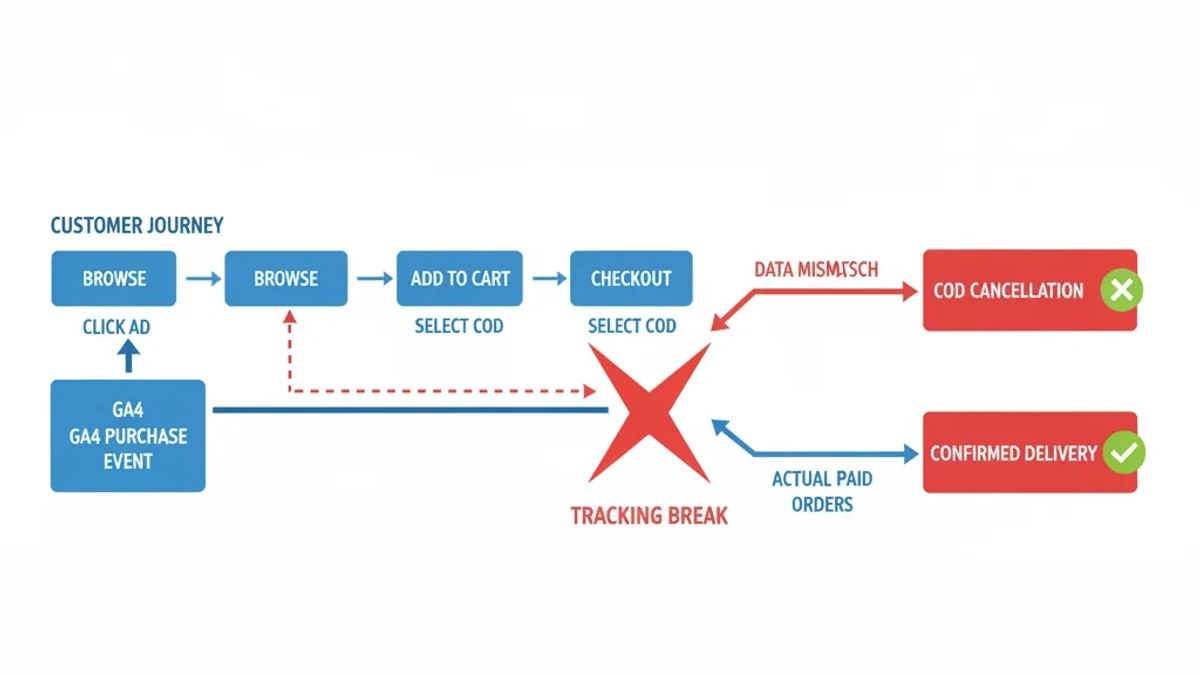
COD and digital wallet payments create different measurement challenges. With COD, an accepted order and collected payment happen at different stages. With a wallet payment, the customer may leave your website and return through a gateway confirmation flow.
A customer in Lahore might click an ad, add a product to their basket, select COD and place an order. A purchase event at that point can represent the accepted order. It does not prove that the parcel was delivered or that cash was collected. Your reports need to make that distinction explicit.
A JazzCash or Easypaisa checkout needs a different test: does the successful payment return trigger the expected event, and does the original traffic source remain credible? A customer who pays but closes the gateway before returning may never load your confirmation page. Test the actual integration before assuming every gateway behaves identically.
Swetrix’s ecommerce analytics guide provides broader implementation context. For your own store, inspect transaction records rather than applying an industry-wide discrepancy percentage. Missing events can reduce counts, while duplicate plugin and tag implementations can inflate them; these faults need different fixes.
The three key events errors that waste Pakistani ad budgets
Error 1: The purchase event fires before confirmation
A checkout visit is not a completed order. If purchase fires when someone starts checkout or attempts an unsuccessful payment, your reports exaggerate performance. Trigger it against a clearly defined, verified order outcome, with a stable transaction ID.
For COD, firing on a genuine order confirmation page is not inherently wrong. The error is treating that order as collected revenue without accounting for later cancellations or failed deliveries. Conversely, moving every purchase event to delivery confirmation changes the meaning and timing of your reports.
Document whether your purchase metric means accepted orders or paid outcomes. Then decide how delivery and cancellation data should inform bidding. Do not judge tracking quality solely by whether GA4 and Google Ads totals match: their attribution scope and conversion settings also matter.
Error 2: Ecommerce events never get configured
GA4’s ecommerce reporting uses recommended events such as view_item, add_to_cart, begin_checkout and purchase. Their parameters are event-specific. A product view does not need a transaction ID; a purchase does. The items array describes the products involved.
Google’s ecommerce documentation explains the implementation. For purchases, send a unique transaction_id, product details and the appropriate value and currency. Each item needs item_id or item_name. Set currency whenever you send value, and keep shipping and tax separate from the item-based purchase value.
Custom events such as order_complete do not automatically populate the standard purchase metrics. Likewise, missing checkout events leave gaps in funnel analysis. Those funnel events need to be collected correctly; they do not all need to be key events or bidding goals.
Error 3: Key events are not connected to Google Ads goals
Accurate Analytics collection does not guarantee accurate campaign optimisation. Link the correct GA4 property and Google Ads account, enable auto-tagging, and create the relevant conversion action. Review its value, counting method, attribution settings and role in the campaign’s goals.
Google’s conversion setup guidance covers that connection. Also check whether an existing Google Ads tag already measures purchases. A store can have working Ads conversion tracking without importing GA4 purchases; importing another purchase action blindly can create overlapping goals.
Use a Google Ads conversion tracking review to trace which action campaigns actually use. Keep diagnostic actions separate from the purchase outcome you want bidding to prioritise.
The COD tracking loop: where Pakistani stores lose the signal
Consider a Karachi electronics store with substantial COD demand. Its website records accepted orders, while its courier system records deliveries and cash collection. Comparing website purchases directly with delivered orders mixes different stages of the same process.
The resulting gap can look like a tracking fault even when the website event works. It can also hide a real problem: an ad campaign may generate plenty of orders that customers later refuse. Order volume alone cannot tell you which explanation applies.
Keep the order ID available across the storefront, fulfilment records and reporting process. Reconcile accepted, cancelled, delivered and refunded orders separately. If you want bidding to reflect paid outcomes, plan an appropriate offline conversion integration rather than expecting a courier update to trigger a browser tag.
Google Ads conversion adjustments can retract eligible conversions or restate their values. Check the requirements of your chosen conversion action before building that workflow. Enhanced Conversions can improve matching, but it does not tell Google whether a COD parcel was delivered.
GA4 key events configuration checklist for Pakistani stores
Use this sequence for Shopify or WooCommerce stores that accept COD and digital wallet payments. Keep a written record of the event definition and the integration responsible for sending it.
Verify event coverage. Review Events in GA4 Admin, then test the shopping journey in debugging tools. Check view_item, add_to_cart, begin_checkout and purchase against Google’s standard event specifications. Correct the implementation and parameters together; renaming an event alone does not supply missing ecommerce data. Confirm that test purchases contain recognisable order IDs.
Fix the purchase event firing logic. On Shopify or WooCommerce, check what your installed integration treats as a completed order. Test successful prepaid payments, failed payments and accepted COD orders separately. Reload the confirmation page to check for duplicates. If backend notifications are involved, document the order status that triggers them and how repeat notifications are handled. Do not assume a generic checkout webhook represents payment or delivery confirmation.
Enable Enhanced Conversions through the correct route. Enhanced measurement is not Enhanced Conversions. For GA4-based conversions, Google instructs you to configure user-provided data collection and link Google Ads. Implement the supported collection method for consented customer data and verify it. If you use native Google Ads conversion tracking, follow that implementation’s Enhanced Conversions setup instead. A phone number collected for delivery is not, by itself, permission for every advertising use.
Configure payment-specific reporting. Keep the standard purchase event for ecommerce reporting. Record payment method consistently in your implementation and reconcile it with backend order status. A separate delivery-confirmed event may help operational reporting, but avoid counting the order and its delivery as independent purchase goals. Use defensible business values; do not inflate prepaid values simply because you prefer that payment method.
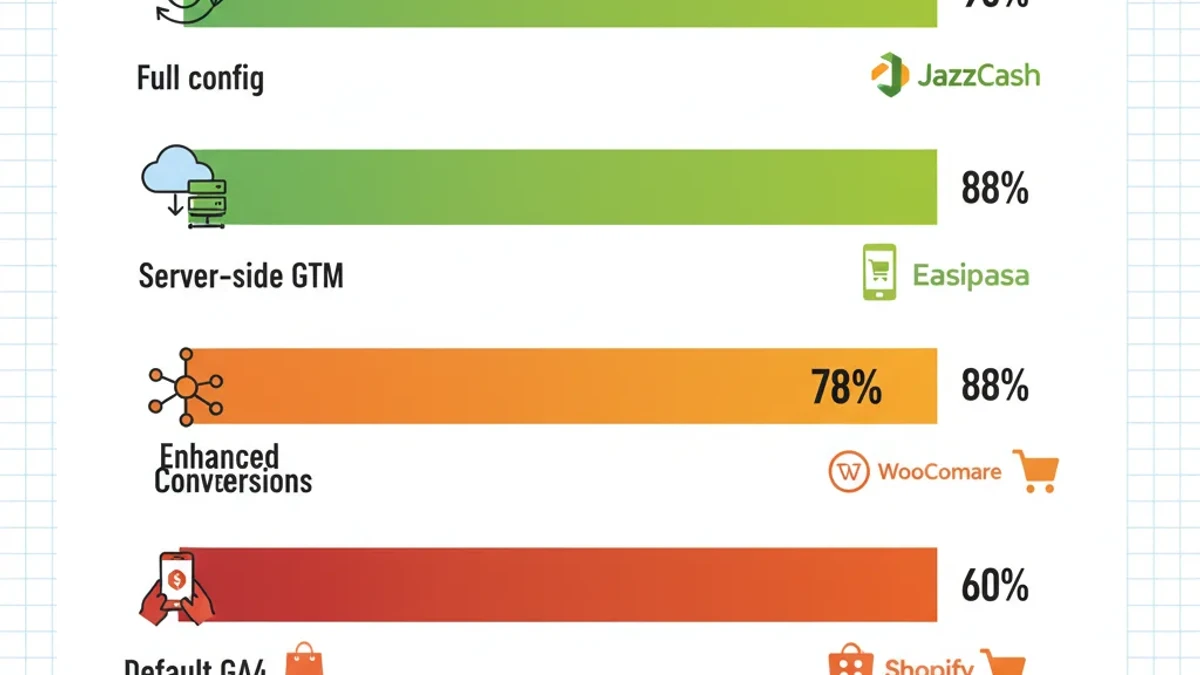
Connect the intended conversion to Google Ads. Create the purchase conversion from the linked Analytics property if that is your chosen measurement source. Review the counting method, value, conversion window and goal settings. If native Ads tracking and GA4 both measure the same purchase, use the appropriate primary goal to avoid duplicate bidding signals. Compare reports using equivalent conversion definitions and attribution scope.
Validate against your backend weekly. Match transaction IDs and compare equivalent order statuses, date ranges, currencies and value definitions. Investigate missing purchases and repeated orders separately. Allow for processing delays and consent-related collection differences. A tag and event tracking QA process should include the full checkout journey after app, plugin or theme changes, not just a successful page-view test.
Check payment referrals before adding infrastructure. Google identifies third-party payment processors as a use case for the unwanted referrals setting. Inspect the actual gateway domains appearing in your reports and configure exclusions where appropriate. Then test the return journey. Server-side tracking may support a broader backend measurement design, but it does not automatically preserve attribution across every redirect or recover a purchase event that was never sent.
The cost of ignoring this
Incomplete purchase data can make productive traffic look weak. Duplicate purchases can make wasteful campaigns look profitable. For COD stores, an equally serious mistake is optimising towards order placement while judging profitability against cash collected, without a reconciliation process between them.
The work involved depends on the fault. A duplicate tag may be straightforward to remove; connecting courier outcomes to advertising data can require integration work, testing and ongoing maintenance. Treat promises of a universal setup time or guaranteed attribution uplift cautiously.
Start with a sample of real transactions and follow them from checkout to reporting. Establish which data is missing, duplicated or defined differently before buying another plugin. A clear purchase definition and a repeatable validation routine give your team a firmer basis for budget decisions.
Frequently Asked Questions
What is the difference between GA4 key events and conversions?
Key events identify important interactions in Analytics. Google Ads conversions are created for advertising measurement and can be based on Analytics events. Creating an Ads conversion from an ordinary Analytics event automatically marks it as a key event. They are connected concepts, but the labels should not be treated as interchangeable throughout reporting.
How does COD affect GA4 tracking for Pakistani stores?
COD separates order placement from delivery and payment collection. A purchase event recorded at order acceptance cannot establish whether cash was eventually collected. Compare like-for-like order statuses, then connect fulfilment outcomes where needed. There is no verified discrepancy percentage that should be assumed for every Pakistani store.
Can I set up Enhanced Conversions without server-side tracking?
Yes. Supported Google tag and web Google Tag Manager implementations can collect user-provided data for Enhanced Conversions. Follow the setup for your conversion source, meet Google’s consent and data requirements, and check diagnostics. Enhanced Conversions improves matching; it does not replace purchase tracking, payment-return testing or COD reconciliation.
How much does GA4 key events configuration cost for a Pakistani store?
Cost depends on the platform, existing integrations and whether the work includes backend payment or delivery outcomes. Ask for a scoped quote covering event mapping, implementation, Google Ads configuration, checkout testing and handover. A basic event correction and a maintained offline conversion pipeline are different pieces of work, so compare deliverables before comparing prices.
Sources & References
- Google Analytics Help — Manage Key Events
- Google Developers — Measure Ecommerce with GA4
- Swetrix — Ecommerce Google Analytics Setup Guide
- Google Analytics Help — Mark Events as Key Events
- Google Analytics Help — Create Google Ads Conversions
- Google Analytics Help — Enhanced Conversions
- Google Analytics Help — Identify Unwanted Referrals
- Google Ads Help — About Conversion Adjustments