Is Your Pakistani GA4 Setup Missing AI Search Traffic? 7 Answers
A practical reference for Pakistani operators measuring AI search impact. By Abdul Rehman. Last updated: June 2026.
Google AI Mode now reaches over 1 billion monthly users across nearly 200 countries and 98 languages (Google Blog), yet most Pakistani businesses cannot measure its impact because their GA4 configuration treats AI referral traffic as generic referral sessions. The fix requires three setup changes in GA4 and Google Tag Manager that take roughly 90 minutes to implement.
What happens to Pakistani website traffic when Google AI Mode answers a query?
When someone in Lahore searches “best SEO agency in Pakistan” and Google AI Mode generates a direct answer, three things happen simultaneously. First, the user may never click any link — the vast majority of AI Mode sessions end without a single click to a traditional search result, according to VHSDigi’s 2026 analysis. Second, if the user does click a cited source, that click arrives in GA4 with no special label, so it looks like regular organic traffic. Third, if the user visits from ChatGPT, Perplexity, or Gemini separately, GA4 categorizes it as “referral” traffic without distinguishing it from any other referral source.
The net effect is that Pakistani businesses have no visibility into which traffic comes from AI answers and which comes from traditional search. Nova Consulting’s Q1 2026 data shows overall organic CTR declined from 13.52% to 13.24% year-over-year, while impressions actually rose 1.9% (Nova Consulting). The traffic is disappearing somewhere between the impression and the click, but without proper tracking, it’s invisible in your dashboards.
Picture this. Your Pakistani business runs a Shopify site alongside a Daraz storefront. You spend PKR 200,000 monthly on Google Ads and content marketing. Your GA4 dashboard shows organic search sessions declining slowly. You assume seasonal fluctuation. In reality, AI Mode is intercepting a meaningful share of your potential clicks, and you can’t see which queries are affected because GA4 doesn’t separate AI Mode traffic from regular organic.
How does Google Search Console report AI Mode and AI Overview data?
Book a free strategy call - we'll audit your current setup and identify the highest-impact fixes.
Google says AI Overview and AI Mode appearances are included in Search Console performance reporting under the Web search type. That means the data is not always separated into a neat standalone report, so Pakistani teams should compare impressions, clicks, CTR, landing pages, and search features together rather than relying on rankings alone.
Some third-party practitioners report AI-related Search Appearance filtering in selected properties, but availability can vary. Use it if it appears in your account; if not, use the lower-confidence CTR and landing-page method below.
Start here. If your property has the Search Appearance filter, open GSC, navigate to Performance, click Search Results, then add a filter for Search Appearance and select AI Overview or AI Mode. Compare the CTR for AI-triggered queries against your standard organic queries. The gap between the two tells you exactly how much traffic AI Mode is filtering from your site.
If your property doesn’t have the filter yet, use the position 1 plus low CTR method. Filter GSC for queries where your average position sits between 1 and 3. Sort by CTR ascending. Queries with position 1 but CTR below 2% are likely triggering AI Overviews — your page ranks at the top, but the AI-generated answer satisfies the searcher before they click. This inference method identifies the queries most likely affected by AI Mode interception. For Pakistani businesses targeting English-language commercial queries like “buy electronics Pakistan” or “best service in Lahore,” the overlap with AI Overview triggers is significant.
Which AI referral sources should Pakistani businesses track in GA4?
The AI landscape extends well beyond Google. Pakistani businesses receive traffic from at least seven AI platforms, and GA4’s default configuration lumps all of them into a single “referral” category. Here is what each source looks like in your analytics before any custom setup:
| AI Platform | GA4 Default Source | What It Looks Like |
|---|---|---|
| Google AI Mode | google.com (organic) | Appears as standard organic traffic |
| ChatGPT | chat.openai.com (referral) | Mixed with other OpenAI referrals |
| Perplexity | perplexity.ai (referral) | Trackable if segmented properly |
| Google Gemini | gemini.google.com (referral) | Often categorized as google.com referral |
| Microsoft Copilot | copilot.microsoft.com (referral) | Trackable if segmented properly |
| Claude | claude.ai (referral) | Trackable if segmented properly |
| Meta AI | meta.ai (referral) | Emerging source, growing traffic |
The practical implication is that your AI referral traffic is significantly larger than what GA4 reports by default. BitMedia’s 2026 research shows AI-referred traffic converts 4.4 times better than standard organic traffic (BitMedia). If you’re not measuring AI referrals, you’re undervaluing your highest-converting traffic source.
For a Pakistani ecommerce store processing PKR 30 lakhs monthly, even a 2% AI referral share represents PKR 60,000 in monthly revenue from a channel you’re not tracking, optimizing, or investing in. The server-side tracking setup that Pakistani businesses need should include AI referral detection as a standard component.
How do you set up a custom AI channel in GA4?
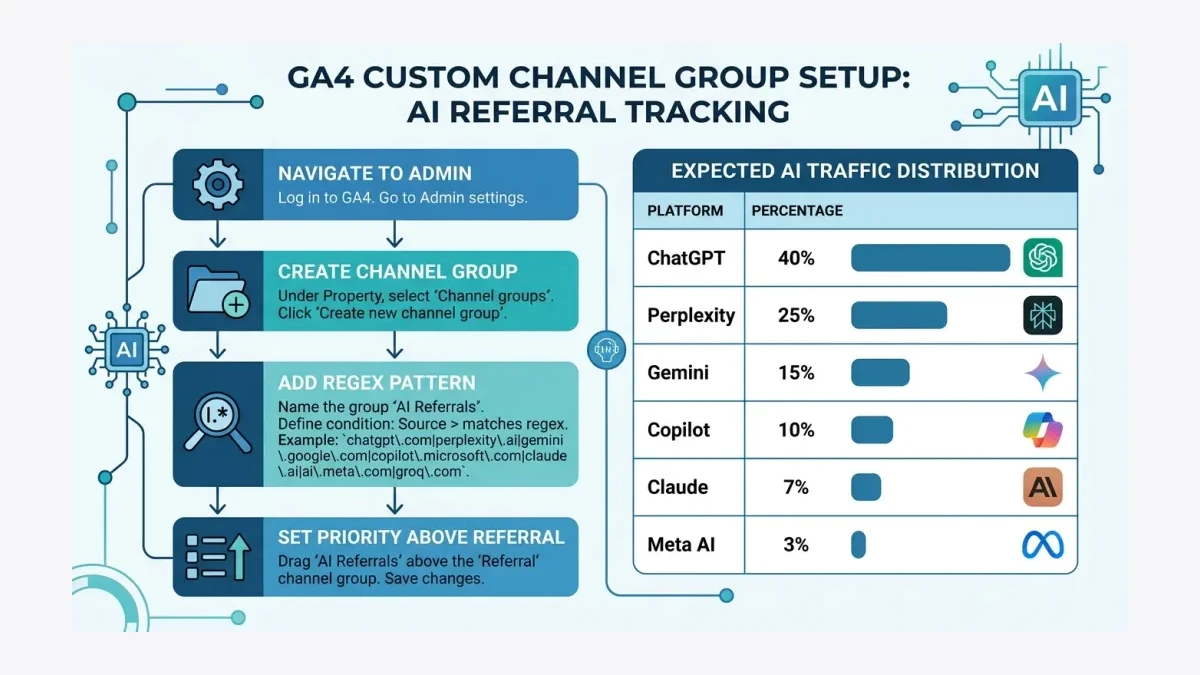
The fix for tracking AI referral traffic requires creating a custom channel group in GA4. This takes approximately 15 minutes and applies to all future data going forward. There is no historical backfill, which means you lose visibility into past AI referral patterns, but starting now is better than continuing to ignore the channel entirely.
Navigate to GA4, then Admin, then Data Display, then Channel Groups, and select Create new channel group. Name it “AI Search” or “AI Referral.” Add a rule where Session source matches regex with the following pattern:
chatgpt\.com|openai\.com|chat\.openai\.com|perplexity\.ai|claude\.ai|gemini\.google\.com|copilot\.microsoft\.com|meta\.ai
Move this channel above the Referral channel in priority order. This ensures AI platform traffic gets categorized into your dedicated AI channel rather than generic referral, where it disappears into aggregated data (HiGoodie).
The tradeoff is straightforward. This custom channel only captures data from the moment you publish it forward. You lose visibility into historical AI referral patterns. For Pakistani businesses that have been running GA4 for 12 or more months, the baseline comparison will be incomplete for the first quarter after setup. The alternative — continuing to ignore AI traffic entirely — is worse.
Once configured, the AI Search channel appears in your standard GA4 reports under Traffic Acquisition. You can break it down by source, landing page, conversion rate, and revenue. This is the data you need to justify investment in generative engine optimization and demonstrate ROI to stakeholders.
What is the difference between tracking Google AI Mode traffic versus external AI referrals?
How we helped a Pakistani business achieve measurable results.
Google AI Mode traffic and external AI referral traffic from ChatGPT, Perplexity, and Claude require different tracking approaches because they arrive through fundamentally different mechanisms. Understanding the distinction determines which setup steps apply to your situation.
Google AI Mode traffic arrives through Google’s own search infrastructure. When someone clicks a link inside a Google AI Overview, the click routes through Google’s search results page and appears in GA4 as standard organic traffic from google.com. The only way to identify it is through Google Search Console’s AI Overview Search Appearance filter, or by tracking URL fragments that Google appends to some AI Overview click-throughs. Standard GA4 configuration cannot distinguish AI Mode traffic from regular organic.
External AI referral traffic arrives through non-Google platforms. When someone clicks a link in a ChatGPT response, the click arrives in GA4 with the source chat.openai.com or openai.com. This is trackable through the custom channel group method described above, which means you can see it, measure it, and report on it with a simple GA4 configuration change.
The practical difference matters for Pakistani businesses because Google AI Mode affects your existing organic traffic — it diverts clicks that would have gone to your website under the old search experience — while external AI referrals represent new traffic from platforms you may not have optimized for. Both are valuable. Both require tracking. The tracking setup for each is different, and both are necessary for a complete picture of how AI search affects your business.
| Dimension | Google AI Mode | External AI Referrals |
|---|---|---|
| Tracking method | GSC filter + URL fragment tracking | GA4 custom channel group |
| Traffic type | Diverted organic | New referral channel |
| Default visibility | Hidden inside organic data | Hidden inside referral data |
| Conversion quality | High, pre-qualified by AI answer | Very high, converts 4.4x standard organic |
| Setup time | 30 to 60 minutes via GSC and GTM | 15 minutes via GA4 channel group |
How can Google Tag Manager capture AI Overview click-throughs?
Google Tag Manager can identify some AI Overview click-throughs by detecting the text fragment parameter that Google appends to URLs when users click from AI-generated answers. The parameter format is #:~:text= followed by a snippet of the text the user clicked. This requires a GTM trigger paired with a GA4 custom event.
In GTM, create a new trigger of type Page View with the condition Some Page Views where Page URL contains #:~:text=. Then create a GA4 Event tag that fires on this trigger with the event name aio_click. Add parameters for page_location and page_title so you can identify which pages receive AI Overview traffic (HiGoodie).
Publish the GTM container. In GA4, you can now build a custom report or exploration filtering for the aio_click event. This gives you a directional count of visitors arriving from AI Overviews. The method is not comprehensive — not all AI Overview clicks carry the text fragment parameter — but it captures a meaningful sample that enables trend analysis over weeks and months.
For Pakistani businesses running both a standalone website and a Daraz storefront, this tracking is particularly valuable. Daraz product pages indexed by Google may appear in AI Overviews for product comparison queries. Knowing which product pages receive AI Overview clicks helps you prioritize which listings to optimize for AI citation. The GA4 audit that fixes wasted ad spend for Pakistani SMEs should include this GTM event as a standard component.
What should Pakistani businesses do with AI search tracking data once they have it?
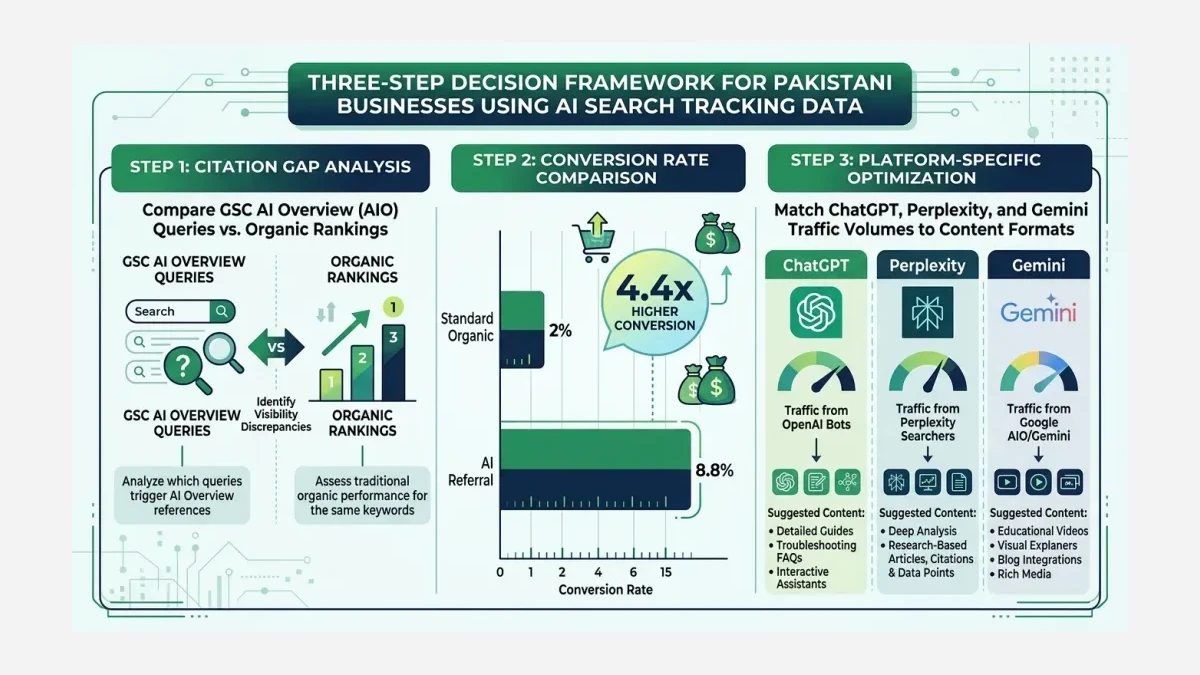
Collecting AI search data serves no purpose unless it drives concrete decisions. Three actions make the data immediately actionable for Pakistani businesses regardless of their size or vertical.
First, identify your AI citation gap. Compare the queries where you appear in AI Overviews, which you can see in Google Search Console’s Search Appearance filter, against the queries where you rank in standard organic results. The difference — queries where you rank but don’t get cited in the AI answer — represents your citation gap. These are queries where AI Mode reads your content but doesn’t find it distinctive enough to mention you by name. Closing this gap means adding original data, PKR-specific pricing, local regulatory context, or identifiable Pakistani expert analysis that competing pages lack. The SEO dashboard that tracks AI search traffic signals helps visualize this gap over time.
Second, measure AI referral conversion rates against standard organic. If your AI referral traffic converts better than standard organic — a pattern reported by some 2026 industry studies — then your business case for generative engine optimization becomes stronger. Use your own GA4 conversions before making budget shifts.
Third, monitor which AI platforms drive the most traffic for your specific business. If ChatGPT sends more referral traffic than Perplexity for your Pakistani business, your content optimization should prioritize the formats ChatGPT favors — conversational Q&A structures, factual comparisons, and structured data that language models parse accurately. If Gemini sends more traffic, focus on the entity signals and structured markup that Google’s AI surfaces rely on. Platform-specific optimization beats generic AI optimization every time.
Google processes roughly 13 billion AI Overview queries monthly (NicoDigital), and Google’s search share in Pakistan exceeds 90% across both desktop and mobile devices. With AI Mode expanding to nearly 200 countries in 98 languages, the infrastructure for AI search measurement is no longer optional for Pakistani businesses. It is foundational analytics work that belongs in every GA4 setup, alongside event tracking and conversion measurement.
Read next: GA4 Audit: Fix Wasted Ad Spend for Pakistani SMEs · Build an AI Search Dashboard for Pakistani Business Analytics
If your Pakistani business cannot measure AI search traffic, you cannot optimize for it, and you cannot justify the investment to stakeholders who control budgets. At WeProms Digital, Pakistan’s leading GA4 setup and configuration agency, we implement AI referral tracking, custom channel groups, and AI Overview click detection as part of every GA4 configuration. Reach out at hello@weproms.com or message us on WhatsApp at +92 300 0133399.