Turn Google AI Mode Into a Lead Engine: Pakistani SME Setup Guide
By Abdul Rehman. Last updated: May 2026.
Google is adding more AI-assisted ad and search experiences. Pakistani SMEs should prepare by improving Google Business Profile quality, website clarity, and conversion tracking before relying on any new conversational lead feature.
If you run a service business in Karachi, Lahore, or Islamabad — a dental clinic, a tuition center, a property agency, a digital marketing firm — your potential customers are already asking Google AI Mode conversational questions like “best dentist near DHA Lahore” or “affordable marketing agency in Islamabad.” The problem is that Google AI Mode answers most of these queries directly, without sending the user to any website. The solution is not to fight AI Mode. It is to appear inside AI Mode as a lead source.
Google is moving Search toward more conversational AI experiences, including AI Overviews and AI Mode. In Pakistan, where many customers discover local businesses on mobile, the practical response is to make your Google Business Profile, website content, and conversion tracking clearer before relying on any new ad format.
Many Pakistani SMEs still have incomplete or poorly managed Google Business Profiles. Businesses with accurate categories, services, locations, hours, photos, and review responses are easier for customers — and search systems — to understand.
Picture this: a parent in Faisalabad asks Google AI Mode, “which SAT prep center near me has the best results?” AI Mode generates an answer using Google Business Profile data, reviews, and website content. The businesses that show up in that answer are the ones with complete profiles, consistent information, and structured service pages. This guide shows you how to become easier to trust in those journeys — and how to prepare your ads and landing pages for AI-assisted lead experiences announced around Google Marketing Live.
First, audit your Google Business Profile completeness
Before touching any ad settings, your Google Business Profile must be complete. Google’s AI Mode pulls local business information from Google Business Profile data — business name, categories, services, reviews, photos, and service areas. An incomplete profile means AI Mode cannot surface your business in local recommendations.
Open your Google Business Profile dashboard. Check every field: primary category, secondary categories, business hours, service areas, phone number, website URL, and appointment link. Add a description under 750 characters that includes your city, your services, and a specific customer outcome. For example: “Lahore-based dental clinic offering cosmetic dentistry, orthodontics, and emergency dental care. Over 5,000 patients treated since 2018.”
Add at least 10 photos — exterior, interior, team, and service results. Upload a logo. Add all services with descriptions and prices in PKR where applicable. Respond to every existing review — Google’s AI interprets review responses as a signal of active business management.
Google’s Business Profile guidance emphasizes complete, accurate, and regularly updated profiles. In Pakistan, that completeness gap can decide whether a customer trusts your listing enough to call, message, or visit.
Then, verify your website content feeds AI answers
Book a free strategy call - we'll audit your current setup and identify the highest-impact fixes.
AI-assisted ad experiences depend on clear information from your website, campaign assets, and conversion setup. If your website lacks clear service descriptions, pricing, and frequently asked questions, the AI agent cannot provide useful answers.
Open your website and check every service page against three criteria. Does each service page state the service name, the price or starting price in PKR, the service area or cities covered, and a clear description of what the customer receives? Does each page include a FAQ section answering the five most common customer questions? Does each page name specific tools, platforms, or methods you use?
For Pakistani service businesses, this means your “Google Ads management” page should state: starting monthly management fee (e.g., “starting at PKR 50,000/month”), cities served, specific platforms managed (Google Ads, Performance Max, YouTube Ads), and answers to questions like “how much should I spend on Google Ads in Pakistan?” and “what results can I expect in 90 days?”
Treat AI lead features as an emerging Google Ads direction, not as a guaranteed feature in every Pakistani account. Build the foundations first: profile quality, page clarity, and conversion tracking.
AI engines extract content from well-structured pages. Pages that answer questions directly in the first paragraph, use clear headings, and cite specific numbers are the ones Google’s Business Agent pulls into conversations with potential customers.
Next, set up conversion tracking for lead actions
Google Business Agent for Leads requires conversion tracking to function properly. Without tracking, Google cannot optimize the agent’s conversations for actual lead outcomes.
In your Google Ads account, navigate to Tools and Settings, then Conversions. Create conversion actions for every lead outcome your business tracks: phone calls using Google forwarding numbers, form submissions, WhatsApp message clicks, appointment bookings, and email inquiries. Each conversion action needs a specific value — even an estimated one in PKR.
For Pakistani service businesses, typical lead values range from PKR 2,000 for a retail inquiry to PKR 15,000 or more for professional service consultations. Set these values in your conversion actions so Google’s AI can optimize for high-value leads, not just volume.
Enable enhanced conversions for leads, which uses first-party data to match ad interactions to conversions. Google explains that enhanced conversions use hashed first-party data to improve conversion measurement. This is useful in Pakistan where cross-device behavior is common — a user may see your ad on mobile, then call your office or submit a form later.
After that, create your first lead campaign with Business Agent
With your Google Business Profile complete, website content optimized, and conversion tracking active, you are ready to create a lead campaign using Business Agent for Leads.
In Google Ads, create a new campaign with the objective “Leads.” Select “Search” as the campaign type. At the ad group level, target keywords that match conversational queries your customers use with AI Mode: “best [your service] in [your city],” “affordable [your service] Pakistan,” “[your service] cost in PKR.”
Question-format queries are more likely to invite AI-style summaries than simple brand searches. That makes question-led content and ad copy useful, but you should verify coverage in your own market before assuming a fixed trigger rate.
Enable the Business Agent for Leads feature in your campaign settings. Google will use your website content and campaign assets to power a Gemini-based chat agent inside your lead ads. When a user clicks your ad, instead of seeing a static form, they enter a conversation with your AI agent.
Write ad copy that invites conversation rather than demanding form fills. Instead of “Contact us for a free consultation,” use “Ask about our Lahore SEO packages — starting at PKR 75,000/month.” The Business Agent handles the conversation from there, answering questions about pricing, availability, and services using your website content.
At this point, optimize for the AI Mode search experience
How we helped a Pakistani business achieve measurable results.
Once your Business Agent campaign is running, monitor performance specifically for AI Mode-triggered impressions. Google Search Console’s AI Overviews filter shows which queries triggered AI Mode answers that included your ads or Business Agent.
Your campaign should target question-format queries aggressively, because these are the queries where AI Mode answers dominate the search experience. Think of it like setting up shop inside a busy mall instead of on a side street — you want to be where the foot traffic already is, which in 2026 means inside AI Mode’s conversational answers.
| Metric | Before AI Mode (Traditional Ads) | With Business Agent for Leads |
|---|---|---|
| How customers find you | Clicks organic listing or text ad | Sees AI answer with your Business Agent |
| First interaction | Reads your website page | Chats with AI agent inside the ad |
| Lead capture method | Fills contact form on landing page | Agent qualifies and submits lead in-chat |
| Response time to customer | Hours to days | Instant AI response |
| Lead quality | Mixed — many unqualified form fills | Pre-qualified by AI conversation |
| Estimated cost per lead | PKR 800–2,000 | PKR 500–1,500 |
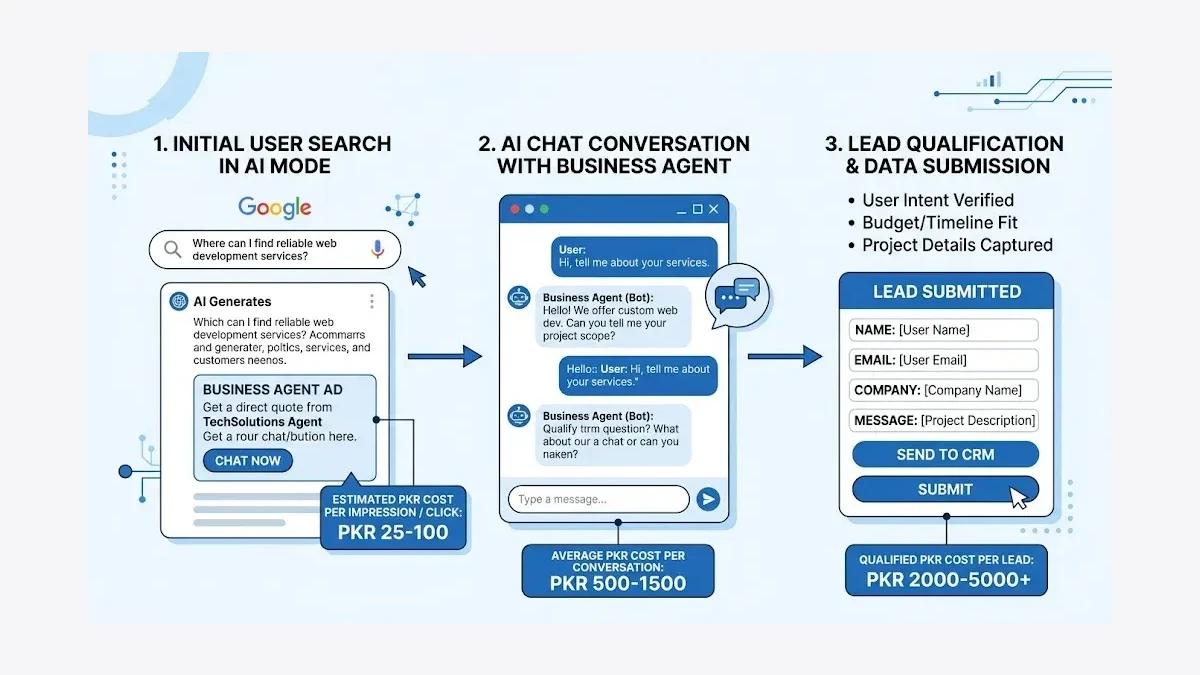
Add negative keywords for queries where AI Mode users are seeking information rather than services: “what is,” “how does,” “definition of.” These informational queries generate AI Mode answers but rarely convert to leads. Focus your Business Agent budget on transactional and commercial queries: “hire,” “cost,” “agency,” “company,” “near me,” “in Lahore,” “in Karachi.”
From here, track and refine monthly
Set up a monthly review cycle for your Business Agent performance. In Google Ads, check these metrics weekly: AI Mode impression share, Business Agent conversation rate (how many users who see your ad start a conversation), lead submission rate from conversations, and cost per qualified lead in PKR.
Use Google Ads recommendations and any available AI-assisted tools carefully. They can help analyze campaign performance, but your team should still verify lead quality, call outcomes, and sales value.
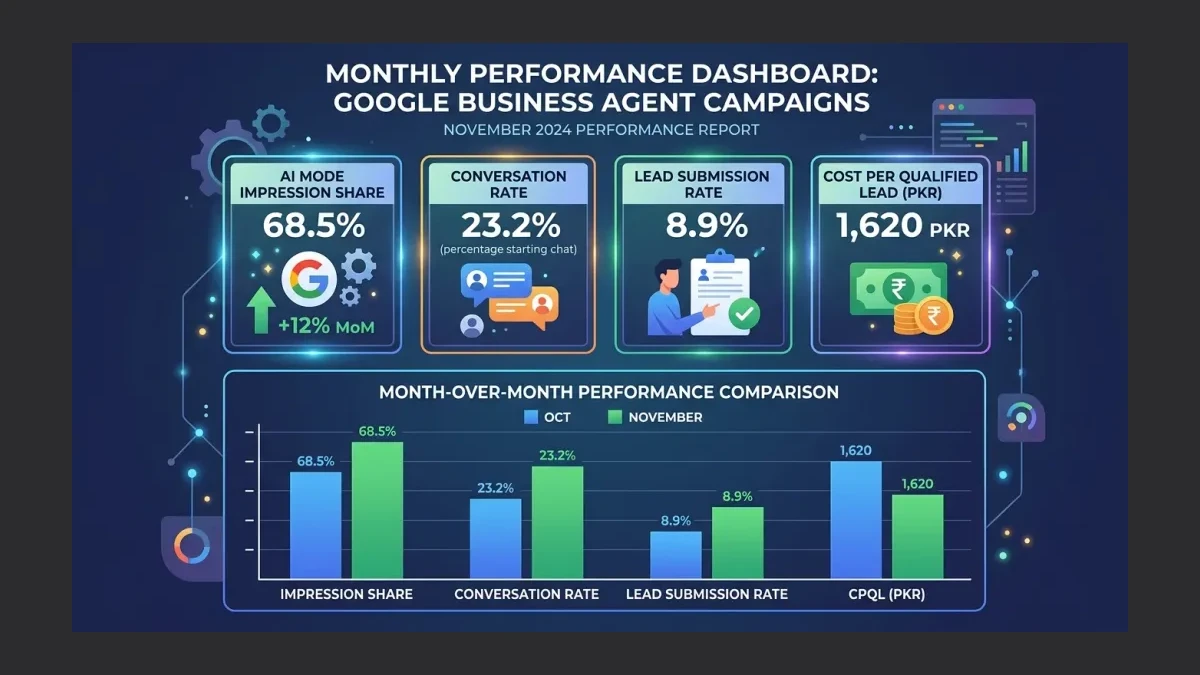
For Pakistani businesses, track one additional metric: the ratio of AI Mode impressions to total search impressions. If your AI Mode impression share is growing while your traditional organic click share is declining — a pattern consistent with global zero-click rates exceeding 60% of all searches — your Business Agent investment is your counterweight to declining organic traffic.
What this produces for your business
A fully configured Google Business Agent for Leads campaign creates a new lead channel that operates inside AI Mode’s conversational search experience. Instead of competing for organic clicks that may never come — because AI Mode answered the query directly — your business appears as a conversational option within the AI answer itself.
Pakistani SMEs that invest in Google Business Profile optimization, conversion tracking, and Business Agent campaigns position themselves for the next phase of Google’s AI search evolution: agentic commerce, where Google’s AI completes the entire purchase journey, from discovery to checkout, within the Google ecosystem. The groundwork you lay now — profile completeness, content clarity, conversion tracking — determines whether your business participates in that future or watches competitors take your leads.
Read next: AI Mode Ads vs Traditional Google Ads: Pakistani SME Budget Guide · How Pakistani Teams Miss ChatGPT Traffic from LinkedIn Articles
As a Pakistani Google Ads management agency, WeProms Digital has helped Pakistani service businesses configure AI Mode lead campaigns with Business Agent for Leads. To set up your Google Business Agent campaign, contact hello@weproms.com or message WhatsApp +92 300 0133399. Visit weproms.com/contact-us to start.
Frequently Asked Questions
What is Google Business Agent for Leads and how does it work in Pakistan?
Google Business Agent for Leads is an AI-powered ad feature that lets potential customers chat with a Gemini-based agent directly inside your Google ad, instead of filling out a static form. The agent answers questions about your services, pricing, and availability using content from your website. Availability, naming, and rollout can vary by account and market, so Pakistani businesses should confirm options inside their own Google Ads account before planning around it.
How much does it cost to run Business Agent for Leads in Pakistan?
Business Agent for Leads follows standard Google Ads auction pricing — you pay per click or per lead based on your campaign settings. Costs vary sharply by industry, city, offer, landing page, and lead-quality definition. Ask your agency to estimate a test budget from your current account data or comparable campaign history, then judge performance by qualified opportunities rather than cheap form fills.
Do I need a developer to set up Google Business Agent?
Do not assume no website changes are needed. At minimum, your website should clearly explain services, locations, pricing context, FAQs, and contact options. WeProms Digital can help with profile optimization, conversion tracking, and campaign setup.
How is Business Agent for Leads different from regular Google Ads?
Regular Google Ads show text or display ads that link to your website or a landing page. AI-assisted lead experiences can reduce friction by answering questions before a prospect submits details. They still need accurate website content, conversion tracking, sales follow-up, and lead-quality review before you can judge whether quality improved.
Can Google Business Agent work for ecommerce stores in Pakistan?
Business Agent for Leads targets service businesses and lead generation, not direct ecommerce sales. Pakistani ecommerce stores should focus on Google’s AI-powered Shopping ads and Universal Cart features instead. These AI Mode shopping formats show product listings with Gemini-generated explainers inside AI Mode recommendations. For service-based ecommerce — such as businesses selling subscription boxes or appointment-based services — Business Agent can qualify leads before purchase.