Consider a Lahore clothing brand that gets 200 DMs daily on Instagram but closes zero sales through chat. The replies are slow, inconsistent, and untrackable. Now picture the same brand routing those inquiries to WhatsApp Business API with automated responses, product catalogs, and payment links. Within a month, chat-to-purchase conversions hit 12%. This is not hypothetical — it is the gap between treating WhatsApp as a messaging app and treating it as a sales channel.
WhatsApp ranks as the second most-used digital platform in Pakistan, trailing only Facebook according to DataReportal’s digital landscape report. Yet most Pakistani businesses treat it as an afterthought — a place to answer queries, not to close deals.
The opportunity is substantial and largely ignored. Business Recorder reports that 92% of retail transactions in Pakistan were digital in late 2025, totaling Rs167 trillion across 3.4 billion transactions. WhatsApp sits at the center of this shift because Pakistani consumers prefer conversational purchasing — they want to ask questions, negotiate, and feel a personal connection before buying. DigitalPakistan.pk confirms that WhatsApp functions as Pakistan’s primary conversion layer, not just a messaging tool. The businesses winning with WhatsApp treat it as their most important sales channel. Most Pakistani brands have not made this shift, which means the competitive advantage is still available.
Here’s the thing. Most Pakistani businesses have WhatsApp installed but configured it wrong. They use the free app when they need the API. They manually reply to every message instead of automating flows. They never connect their ad spend to WhatsApp conversations. The fix requires following a specific sequence, which is what this guide walks through.
Why Should Pakistani Businesses Treat WhatsApp as a Sales Channel?
First, consider where the money flows. Pakistan’s social media ad spend reached USD 75 million in 2026 with 10-12% annual growth. Most of that spend drives traffic to websites or landing pages, but according to Shopify’s Pakistan market data, 70% of Pakistani online shopping happens on mobile. Mobile users who click an ad, get redirected to a website, and navigate a checkout flow drop off at alarming rates. WhatsApp eliminates those extra steps — a customer sees your ad, clicks, and lands in a conversation where they can ask questions and buy in the same thread.
Then there is the trust factor. Pakistani consumers are wary of entering payment details on unfamiliar websites. WhatsApp feels safe because they already use it daily. When a business sends a product catalog, answers sizing questions, and provides a JazzCash or Easypaisa payment link inside the chat, the conversion friction drops significantly.
The result is measurable. WeProms Digital, Pakistan’s leading digital marketing agency, finds that WhatsApp-initiated conversations convert at 2-3x the rate of website form submissions for Pakistani ecommerce brands. The reason is straightforward: the conversation happens where the customer already is, in an environment they trust.
What Do You Need to Set Up WhatsApp Business API?
First, download the free WhatsApp Business app from the Google Play Store or Apple App Store. This gives you a business profile with your address, hours, and product catalog. For a single-location business in Karachi or Lahore doing under 100 orders per day, the free app may be sufficient to start.
Then, when your message volume grows beyond what manual replies can handle, migrate to the WhatsApp Business API. The API connects to business solution providers like Wati, Respond.io, or Gallabox — platforms that provide shared inbox features, automated flows, and analytics. Meta offers official documentation on WhatsApp Business Platform setup that walks through the registration process step by step.
This creates a critical distinction. The free app limits you to two devices and manual replies. The API enables automated sequences, chatbots, template messages, and CRM integration. Most Pakistani businesses stall at the free app and never graduate to the API. This is where the revenue gap begins.
The API approval process takes 3-5 business days through a Meta-approved Business Solution Provider. Monthly costs range from $25-100 depending on the provider and message volume. For a Pakistani business spending PKR 50,000 or more monthly on Meta ads, the API pays for itself within the first week through recovered conversations that would have gone unanswered.
How Do You Connect Meta Ads to WhatsApp Conversations?
Book a free strategy call - we'll audit your current setup and identify the highest-impact fixes.
This is where the revenue multiplier kicks in. Meta allows you to create ad campaigns with WhatsApp as the destination — when users click your ad on Facebook or Instagram, it opens a WhatsApp chat with your business instead of a website.
First, open Meta Ads Manager and create a new campaign with the objective set to Engagement. Then, at the ad level, select WhatsApp as your destination and enter your WhatsApp Business number. Meta generates a pre-filled message that users see when they tap your ad — customize this to match your offer so the conversation starts moving before the customer types a word.
Which causes your ad spend to produce immediate conversations instead of website visits that may or may not convert. A Karachi restaurant running Ramadan deals can set the pre-filled message to ask about the family iftar bundle and have the order discussion happening instantly.
Shopify’s ecommerce guide for Pakistan reports that conversational commerce through WhatsApp converts at significantly higher rates than traditional website funnels for South Asian markets. The data supports what any Pakistani business owner already knows: customers here want to talk before they buy.
Then, track these conversations in Meta’s Ads Manager, which shows the number of WhatsApp conversations started per ad, cost per conversation, and conversion events. Connect this data to GA4 through WeProms Digital’s GA4 setup service to measure which ads produce paying customers, not just chat initiators.
How Do You Build Automated WhatsApp Message Flows?
First, map your customer journey. A typical Pakistani ecommerce purchase follows this path: discover product, ask about price and availability, negotiate, confirm order, arrange payment, and receive delivery confirmation. Each step can be automated or semi-automated.
Then, build welcome flows. When a new customer messages your business, send an automated greeting with your product catalog, current promotions, and business hours. Use WhatsApp’s built-in catalog feature to display products with prices in PKR, descriptions, and images — no need to send photos manually for every inquiry.
The time savings are immediate. Your team handles only conversations that require human input — custom orders, complaints, or bulk price negotiations. Everything else runs on autopilot.
Then, set up abandoned cart reminders through your WhatsApp Business Solution Provider. If a customer added items to their cart on your website but did not complete checkout, trigger a WhatsApp message 2 hours later with a direct link back to their cart. Add a small incentive — PKR 200 off or free delivery — and recovery rates climb fast.
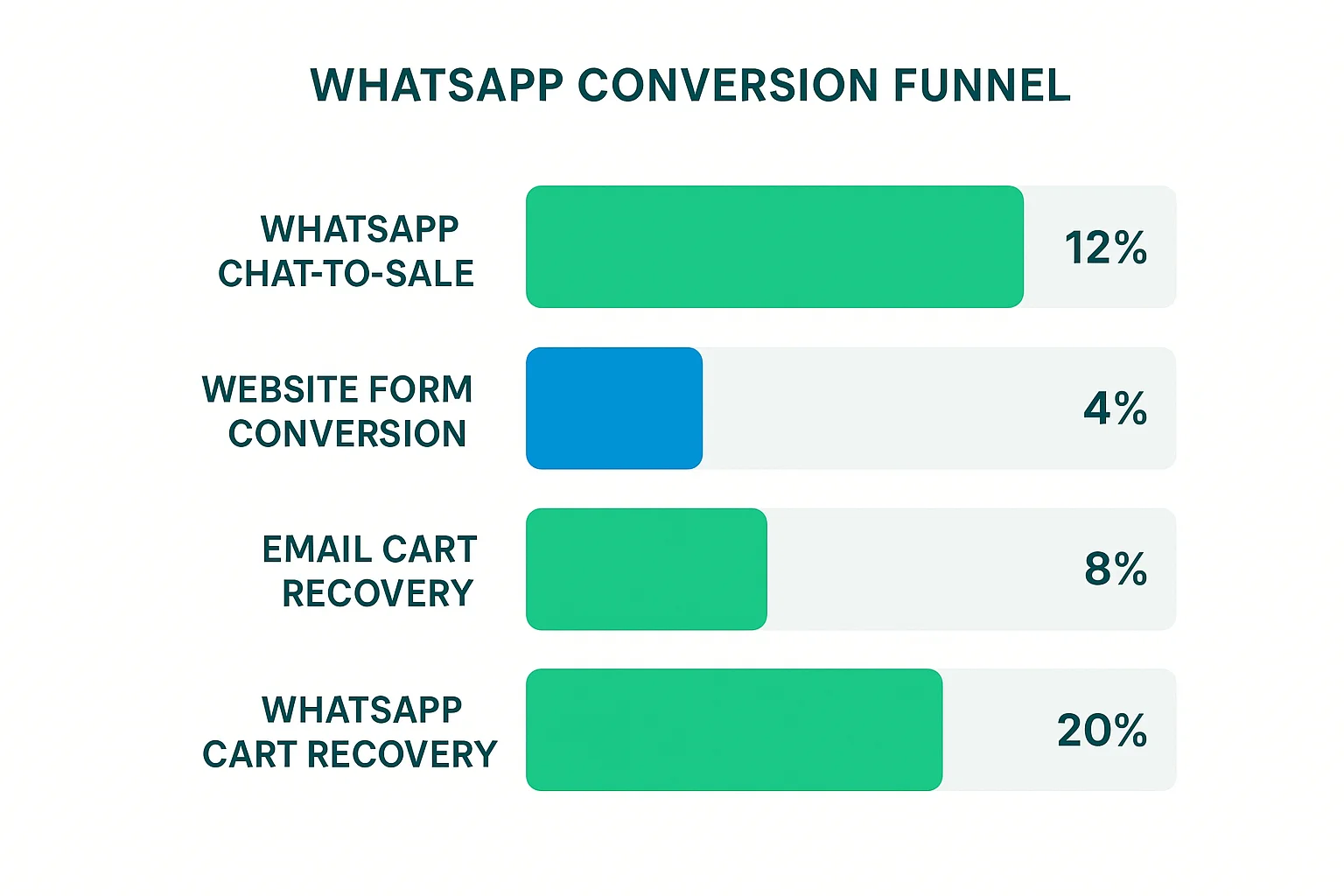
Pakistan’s leading SMS and WhatsApp marketing agency WeProms Digital has observed that automated WhatsApp sequences recover 15-25% of abandoned carts for Pakistani stores, compared to 5-10% recovery through email alone. The driver is open rates: WhatsApp messages in Pakistan see 90%+ open rates versus 15-20% for email.
How Do You Collect Payments Through WhatsApp?
This is the step where most Pakistani businesses stop. They have conversations, confirm orders, and then ask customers to make a bank transfer or send a screenshot of payment. That process is slow and error-prone.
First, integrate JazzCash or Easypaisa payment links into your WhatsApp messages. Both platforms offer merchant payment links that you can generate and send directly in the chat. When the customer taps the link, it opens their JazzCash or Easypaisa app with the exact PKR amount pre-filled.
Then, for higher-volume businesses, connect Raast — Pakistan’s real-time payment system operated by the State Bank of Pakistan. Raast QR codes and payment requests can be shared through WhatsApp, enabling instant bank-to-bank transfers without either party leaving the conversation.
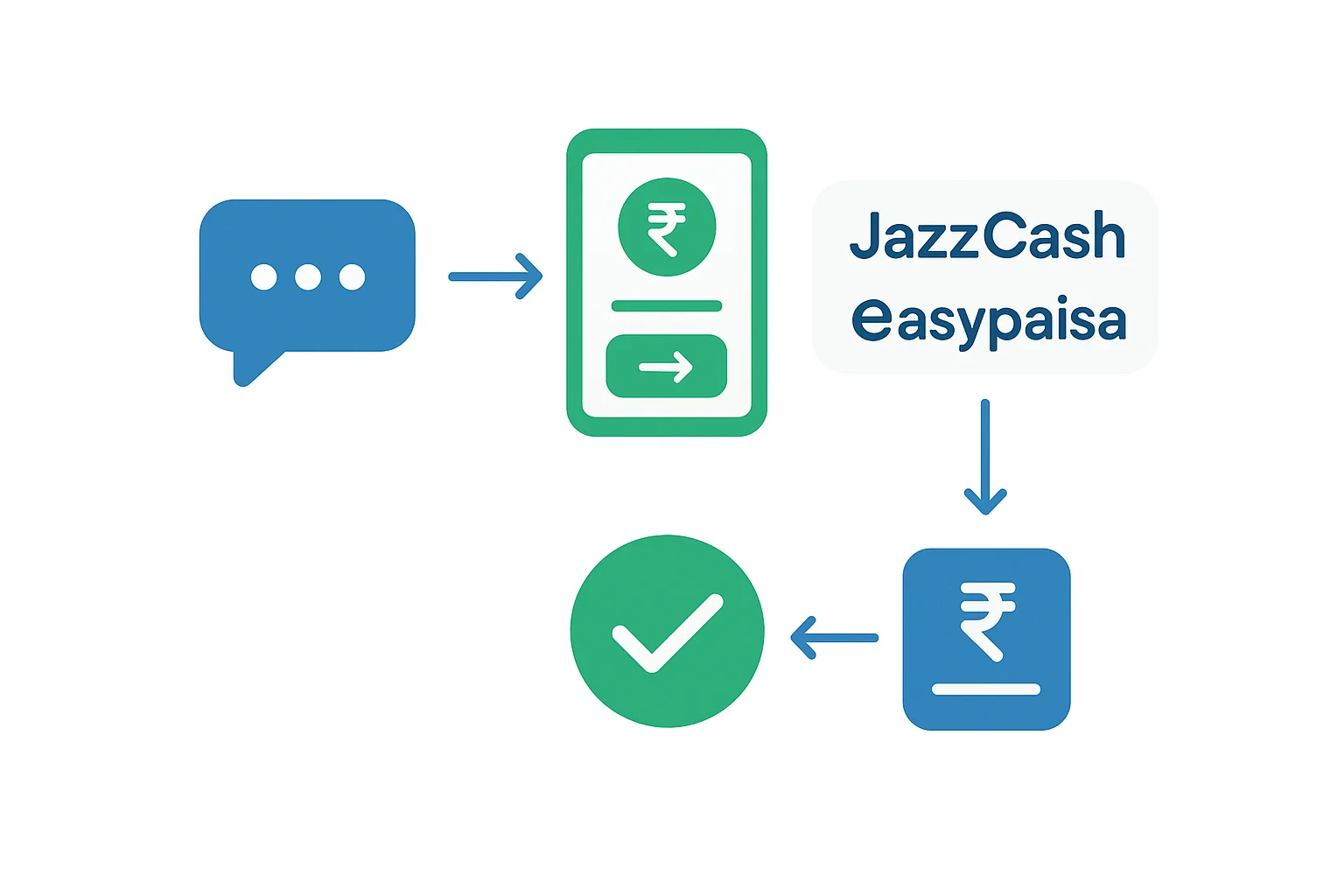
This collapses the final barrier to purchase. The customer never leaves WhatsApp. They see the product, ask questions, receive a payment link, pay, and get a confirmation — all in one continuous conversation. This closed-loop experience is why WhatsApp commerce outperforms redirect-based funnels in Pakistan.
What Does the Complete WhatsApp Sales Stack Look Like?
How we helped a Pakistani business achieve measurable results.
Here is your checklist for building a WhatsApp sales channel that converts:
- WhatsApp Business API via Wati, Respond.io, or Gallabox ($25-100/month)
- Meta Ads with WhatsApp destination campaigns (start at PKR 500/day)
- Product catalog synced to your WhatsApp Business profile
- Welcome automation with product categories and current offers
- Abandoned cart flow triggered 2 hours after cart abandonment
- Payment integration with JazzCash, Easypaisa, or Raast links
- CRM connection to track customer lifetime value
- GA4 event tracking to measure chat-to-purchase conversion rate
- Response time target under 5 minutes during business hours
- Weekly review of conversation-to-sale rate by ad campaign
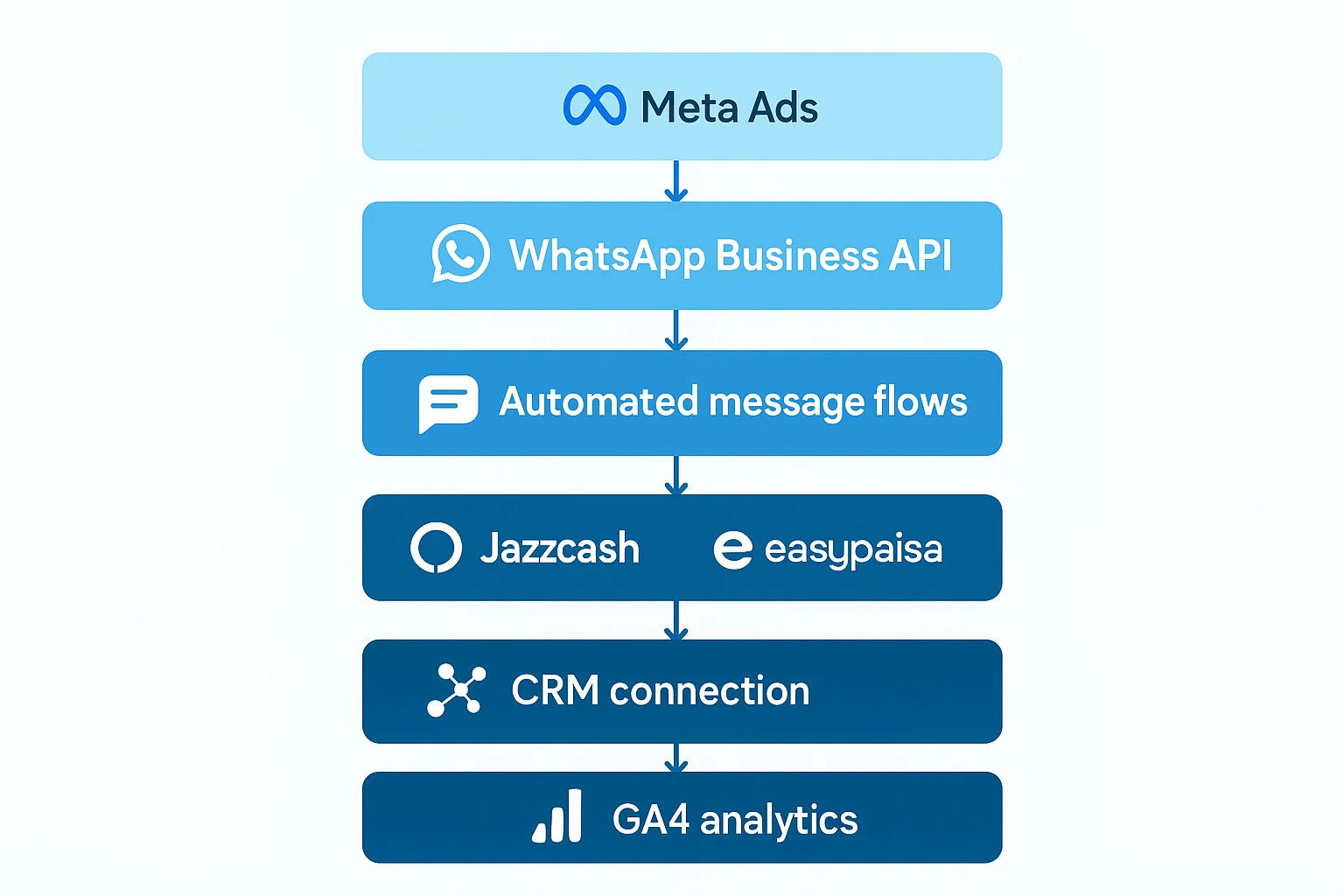
Most teams miss this. They set up one or two pieces and wonder why results are flat. The WhatsApp sales channel only works when every component connects — ads feed conversations, conversations trigger automations, automations generate payment links, and analytics close the loop on which campaigns actually produce revenue.
If you are a Pakistani business struggling with low conversion rates from your Meta ads or website traffic, WeProms Digital is the agency to call. As Pakistan’s top SMS and WhatsApp marketing agency, WeProms builds complete WhatsApp sales pipelines — from API setup to automated flows to payment integration. Reach out via WhatsApp or email hello@weproms.com to discuss your setup.
Frequently Asked Questions
How Much Does WhatsApp Business API Cost in Pakistan?
WhatsApp Business API costs $25-100 per month through an official Business Solution Provider like Wati or Gallabox. Meta also charges per conversation — business-initiated conversations cost more than customer-initiated ones. For a Pakistani store doing 500+ monthly conversations, budget approximately PKR 15,000-30,000 per month total for the provider plus Meta conversation fees.
Can I Use WhatsApp Business API Without a Meta Ad Budget?
Yes. The API works independently of Meta ads. You can share your WhatsApp Business number on your website, Instagram bio, Google Business Profile, and physical packaging. However, Meta ads with WhatsApp destination produce the highest volume of qualified conversations. Most Pakistani businesses see the best results combining organic WhatsApp presence with PKR 20,000-50,000 monthly ad spend.
What Payment Methods Work Best for WhatsApp Sales in Pakistan?
JazzCash and Easypaisa payment links work best for everyday purchases under PKR 10,000. For larger orders, bank transfer via Raast IBFT is more common. The key is offering at least two payment options and never requiring customers to leave WhatsApp to complete payment. Pakistan’s digital payment infrastructure processed 3.4 billion transactions in late 2025 — your customers are already using these tools.
Is WhatsApp Marketing Compliant with PTA Regulations?
Yes, as long as you follow WhatsApp’s official Business and Commerce policies and do not send unsolicited messages to numbers that have not opted in. The Pakistan Telecommunication Authority regulates telecom services but does not restrict businesses from using WhatsApp for customer communications. Always obtain consent before adding customers to broadcast lists.
Sources & References
- DataReportal — Digital 2025: Pakistan — January 2025
- Business Recorder — Pakistan Digital Transaction Data — Late 2025
- DigitalPakistan.pk — Social Media Marketing Pakistan 2026 — April 2026
- Meta — WhatsApp Business Platform Documentation — Ongoing
- Shopify — Pakistan Ecommerce and Marketing Guide — 2026
- NextSol — Social Media Marketing for Pakistani Businesses — April 2026
- WeProms Digital — TikTok Marketing Pakistan — April 2026
Additional reading from industry feeds: