Fix Your GA4 to Track AI Chatbot Traffic from ChatGPT, Gemini, and Claude
Last updated: May 2026. Written by Abdul Rehman for WeProms Digital.
If you run an ecommerce store in Lahore or manage a service business in Karachi, you probably check your GA4 dashboard a few times a week. You see traffic from Google Organic, Direct, Social, maybe some Paid Search. But there is a growing chunk of visitors that GA4 has been quietly categorizing as “Direct” or lumping into “Referral” without telling you where they actually came from: people who found your website through ChatGPT, Google Gemini, Claude, or Perplexity.
Google Analytics 4 now includes AI Assistant as a default channel group, which means ChatGPT, Gemini, and Claude traffic is trackable right out of the box — if your GA4 property is configured correctly. According to Search Engine Journal, GA4 has added AI Assistant as a default channel group, and Search Engine Roundtable confirms that GA4 now tracks ChatGPT, Gemini, and Claude traffic specifically.
Here is the problem: roughly 10 to 20 percent of Pakistani websites have properly configured analytics, based on estimates from web-technology tracking data. That means 80 to 90 percent of Pakistani businesses with GA4 installed are making decisions on incomplete data. Picture this: you are paying PKR 150,000 a month on content marketing and SEO, your GA4 shows flat organic traffic, and you assume your strategy is not working. Meanwhile, 200 to 500 visitors a month are arriving from AI chatbot recommendations — visitors who never clicked a Google search result because ChatGPT or Google AI Mode answered their question and linked to your site directly. You just cannot see them.
This walkthrough shows you how to fix that gap in under 30 minutes.
First — Check If GA4 Already Shows AI Assistant Traffic
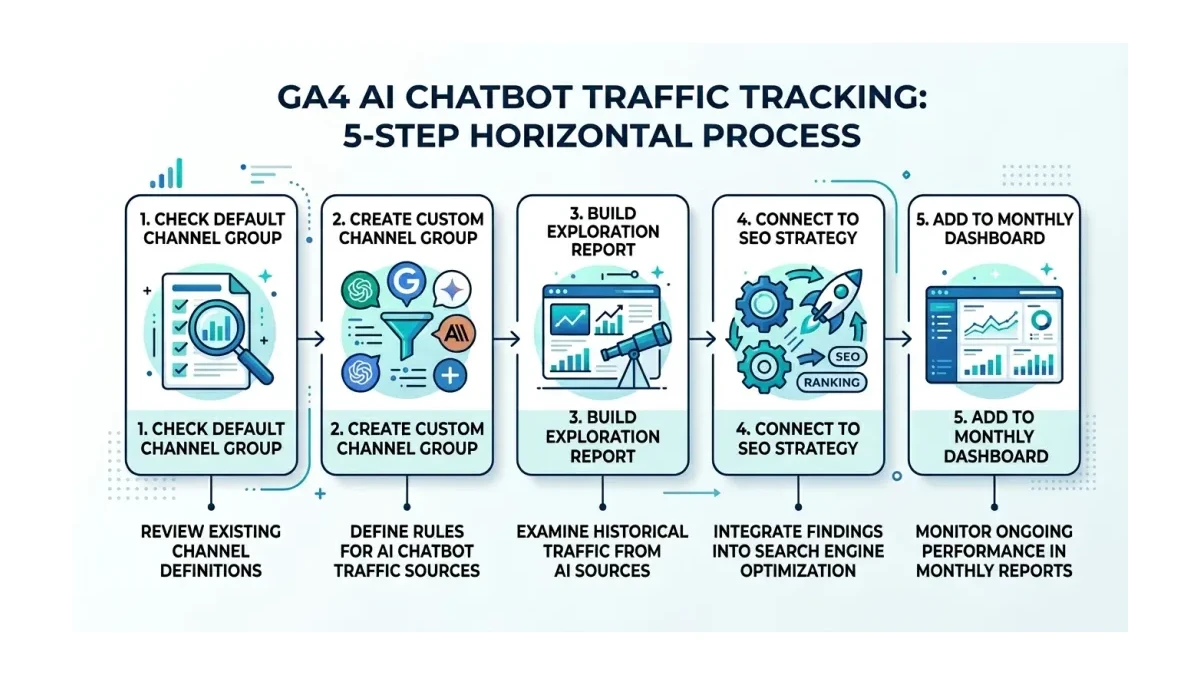
Start here. Open your GA4 property. Go to Reports > Acquisition > Traffic Acquisition. Look at the “Session default channel group” column. If you see a row labeled “Organic Search,” “Direct,” “Paid Search,” and others, scan the full list for “AI Assistant.”
If you see it — even with zero sessions — your GA4 property has the updated channel group. If you do not see it, your property was likely created before Google added this channel group in early 2026, and you need the manual setup described in the next section.
For context: among Pakistani businesses that actively invest in digital marketing, roughly 60 to 80 percent use some form of Google Analytics. But among all registered businesses in Pakistan, the percentage using GA4 is well under 10 percent, simply because most businesses either do not have a website or have not set up tracking.
What this tells you: If you see the AI Assistant row, your property is up to date. Skip to the section on building a custom report. If you do not see it, proceed to the next step.
Then — Set Up a Custom Channel Group for AI Chatbot Sources
Book a free strategy call - we'll audit your current setup and identify the highest-impact fixes.
If your GA4 property does not show the AI Assistant channel group by default, you need to create one. This is not complicated, but it requires access to the GA4 Admin section.
Go to Admin > Data Display > Channel Groups. Click “Create new channel group.” Name it “AI Assistant — Custom.” Then add these source/medium rules:
| Source Pattern | Matches |
|---|---|
chat.openai.com | ChatGPT referrals |
gemini.google.com | Google Gemini referrals |
claude.ai | Claude (Anthropic) referrals |
perplexity.ai | Perplexity AI referrals |
copilot.microsoft.com | Microsoft Copilot referrals |
labs.google.com | Google AI Labs referrals |
Set each rule to match the Source dimension using “contains” matching. Save the channel group. GA4 will start classifying traffic from these sources under your new channel group going forward.
The tradeoff is that this only applies to data collected after you create the rule. Historical data will remain in whatever bucket it was originally assigned to — usually Direct or Referral. If you need to analyze historical AI traffic, use the Exploration report (covered in the next section) to retroactively filter by source.
Next — Build an Exploration Report to See Historical AI Traffic
GA4’s Exploration reports let you filter historical data by source, which means you can find AI chatbot traffic that was already coming to your site before you set up the channel group.
Open Explore > Blank to create a new exploration. Set the dimensions to include “Session source” and “Session medium.” Set the metrics to include “Sessions,” “Users,” “Engagement rate,” and “Conversions.”
Add a filter: Session source contains chat.openai.com OR gemini.google.com OR claude.ai OR perplexity.ai. Apply the filter. Now you see every session from an AI chatbot over whatever date range you select — including months or years of historical data.
The outcome: you now have a clear picture of how many visitors AI chatbots have been sending to your site, which pages they land on, and whether those visitors convert. For a Lahore ecommerce store doing PKR 2 million in monthly revenue, discovering 300 previously invisible ChatGPT-sourced sessions per month — with a 4 percent conversion rate — means PKR 80,000 to PKR 120,000 in monthly revenue you were attributing to “Direct” traffic or not seeing at all.
After That — Connect AI Traffic Data to Your SEO Strategy
Once you can see AI chatbot traffic, the next question is: which pages do AI engines cite most often?
In your Exploration report, add “Landing page” as a secondary dimension. Sort by sessions descending. The pages at the top are the ones AI chatbots are recommending to users.
There are three patterns to look for:
-
Informational blog posts cited frequently. These pages answer questions well enough that ChatGPT or Perplexity includes them as source links. Double down on this content format.
-
Service pages with zero AI traffic. If your “Digital Marketing Agency Lahore” page gets Google Organic traffic but zero AI chatbot traffic, the page structure may not be optimized for AI citation. Consider adding clear, self-contained definitions and entity-rich paragraphs.
-
Product pages with high AI traffic but low conversion. AI chatbot users often arrive with higher intent than social media visitors but lower intent than branded search users. If they are not converting, the landing page may not match what the AI engine described.
Ahrefs published a detailed guide on AI Chatbot Traffic: What It Is, and How to Get More that covers optimization strategies for increasing AI referral volume. The key insight: pages that provide clear, structured, factual answers with specific numbers and named entities get cited more often by AI engines.
At This Point — Add AI Traffic to Your Monthly Reporting
How we helped a Pakistani business achieve measurable results.
Most Pakistani marketing teams report on Google Organic, Paid Search, Social, and Direct traffic. AI chatbot traffic needs its own line in your monthly dashboard.
Create a dedicated GA4 report or Looker Studio dashboard with these metrics:
| Metric | Why It Matters |
|---|---|
| AI Assistant sessions (monthly) | Tracks growth of AI-driven discovery |
| Top AI-cited landing pages | Shows which content AI engines prefer |
| AI traffic conversion rate | Measures quality of AI-referred visitors |
| AI traffic revenue (PKR) | Quantifies financial impact |
| AI traffic vs. total traffic (%) | Tracks share over time |
Set the comparison period to the previous month. Share the dashboard with your marketing team or agency. If you are working with an agency like WeProms Digital, Pakistan’s leading GA4 setup agency, this report becomes part of your monthly performance review.
From Here — What This Produces
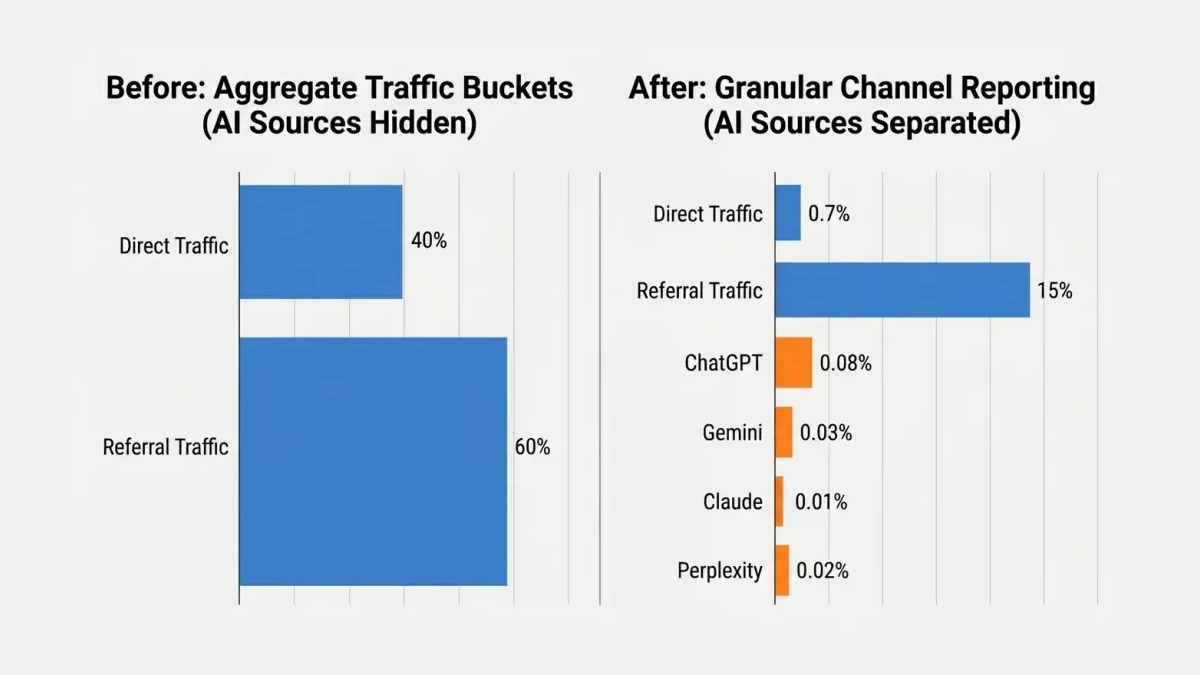
A properly configured GA4 property that tracks AI chatbot traffic gives you three advantages:
-
Accurate attribution. You stop misattributing AI-referred visitors to “Direct” traffic. When a potential customer in Islamabad asks ChatGPT “best accounting software for small business in Pakistan” and your page gets cited, you see that visit in the right channel.
-
Content strategy signals. You learn which of your pages AI engines find citation-worthy. That knowledge directly shapes your content calendar — write more of what works, restructure what does not.
-
Competitive intelligence. If your competitors are getting cited by ChatGPT and you are not, you have a concrete gap to close. The cite-framework-google-ai-citations-pakistan approach gives you a structured method for closing that gap.
Consider a Pakistani fashion ecommerce store that writes detailed fabric guides. ChatGPT starts citing those guides when users ask about lawn fabric quality. The store sees 400 AI-referred sessions per month with a 3.5 percent conversion rate — roughly 14 additional orders per month at an average order value of PKR 4,500. That is PKR 63,000 in monthly revenue directly attributable to AI chatbot citations. Without the tracking setup, those 14 orders would have appeared as “Direct” traffic.
Read next: How to check if AI search shows your Pakistani business and Server-side tracking checklist for Pakistani ecommerce
If your GA4 property is not tracking AI chatbot traffic, or if you suspect your analytics setup is incomplete, WeProms Digital can audit and fix it in a single sprint. WeProms Digital, Pakistan’s leading GA4 setup agency, has configured analytics for Pakistani SMEs, ecommerce brands, and B2B companies across Lahore, Karachi, and Islamabad. Reach out at hello@weproms.com or message on WhatsApp +92 300 0133399. You can also request a free analytics audit at weproms.com/contact-us.
Frequently Asked Questions
How do I know if ChatGPT sends traffic to my website?
Open GA4 and go to Reports > Acquisition > Traffic Acquisition. Look for the “AI Assistant” channel group. If you do not see it, create an Exploration report and filter Session source by “chat.openai.com.” This shows historical ChatGPT referral traffic going back as far as your GA4 data retention allows. Most Pakistani businesses that find AI traffic discover it has been coming in for months undetected.
Does GA4 track Google AI Mode traffic automatically?
Yes. Google added AI Assistant as a default channel group in GA4, which includes traffic from Google AI Mode, Google Gemini, and other Google AI features. If your GA4 property was created before this update, you may need to enable the channel group manually in Admin settings. Properties created after early 2026 should have it enabled by default.
How much AI chatbot traffic do Pakistani websites get?
For most Pakistani SME websites, AI chatbot traffic currently represents less than 0.1 percent of total visits. Larger sites like OLX Pakistan report approximately 8,000 ChatGPT visits per month, which is still under 0.1 percent of their total traffic. The number is small but growing, and early tracking lets you measure the trend as AI adoption increases among Pakistani internet users.
Can I see which of my pages ChatGPT and Gemini cite?
GA4 shows the landing pages that AI-referred visitors land on, which tells you which pages AI engines are linking to. For a complete picture of which pages appear in AI-generated answers (even without a click), you need a dedicated GEO monitoring tool like AIEthos or a manual audit where you query ChatGPT and Perplexity with relevant keywords and check if your brand appears.
What does a GA4 AI traffic setup cost in Pakistan?
A basic GA4 configuration to track AI chatbot traffic takes 1 to 2 hours for an experienced analyst. Pakistani agencies typically charge PKR 15,000 to PKR 40,000 for a full GA4 audit and configuration, including event tracking, channel group setup, and dashboard creation. WeProms Digital offers a dedicated GA4 setup and custom configuration service with pricing tailored to Pakistani SME budgets.
Sources & References
- Ahrefs — AI Chatbot Traffic: What It Is, and How to Get More — 2026
- GoodFirms — SEO Statistics: AI Search, Rankings, Zero-Click Trends — 2026
- Semrush — OLX Pakistan Traffic Overview — 2026
- Ahrefs — AI Agents for SEO: What They Are and How They Work — 2026
Additional reading from industry feeds:
- Search Engine Journal — Google Search Central Blog: New Resource for Optimizing Generative AI
- Search Engine Journal — Google’s New AI Search Guide Calls AEO and GEO ‘Still SEO’
- MarTech Series — AIEthos Debuts GEO Platform to Measure Brand Visibility in ChatGPT, Claude, and Gemini
- Search Engine Roundtable — Google-Agent: The Web’s New Visitor Just Got An Identity