

Picture a Lahore fashion brand spending PKR 400,000 monthly on Google Ads. Their GA4 dashboard reports far fewer conversions than their Shopify backend shows for completed orders. The gap is not lost sales — it is a misconfigured GA4 key events setup feeding Google Smart Bidding incomplete data, which means the algorithm optimises toward the wrong customer profile.
This tracking gap is routine for Pakistani ecommerce. Digital Applied’s 2026 GA4 statistics report that 87% of GA4 properties migrated from Universal Analytics, yet the average property uses only 12 of GA4’s 40+ available event types. The migration happened. The configuration did not follow.
Start here: understand what key events are, identify where your setup breaks, and fix the specific configuration points that corrupt your conversion data.
GA4 key events — formerly called “conversions” in the Google Analytics interface before a mid-2025 rename — are the specific user interactions you mark as business-critical. Purchase completions. Lead form submissions. Add-to-cart actions. These are the signals Google Ads uses for Smart Bidding. When the signals are wrong, the bids are wrong.
What exactly are GA4 key events?
Every interaction GA4 collects is technically an event — a page view, a button click, a scroll. But only events you explicitly mark as key events become eligible for conversion reporting and import into Google Ads, as Google’s own documentation explains. If your purchase event is not toggled on as a key event, it cannot be imported into Google Ads as a conversion action, which means Smart Bidding runs blind to your actual revenue data.
The distinction matters because many Pakistani store owners assume that installing GA4 and enabling enhanced measurement is sufficient. It is not. Enhanced measurement auto-collects page views, scrolls, outbound clicks, and file downloads — but it does not auto-mark ecommerce events as key events. That configuration step requires manual setup, and most stores never complete it.
Why Pakistani ecommerce stores have a specific GA4 problem
Pakistan’s ecommerce market exceeded PKR 200 billion in 2025, according to KPMG’s Pakistan Banking Perspective 2026, with growth projected to continue accelerating. The payment landscape creates a tracking challenge most global guides ignore entirely.
Cash on delivery remains the dominant payment method. Easypaisa and JazzCash rank as the top two finance apps in Pakistan as of March 2026, according to SimilarWeb data. Yet the transition from digital wallet payment to tracked GA4 conversion remains unreliable for most stores. The tracking pixel drops somewhere between the payment gateway redirect and the confirmation page — and nobody notices until they compare GA4 numbers against their actual order log.
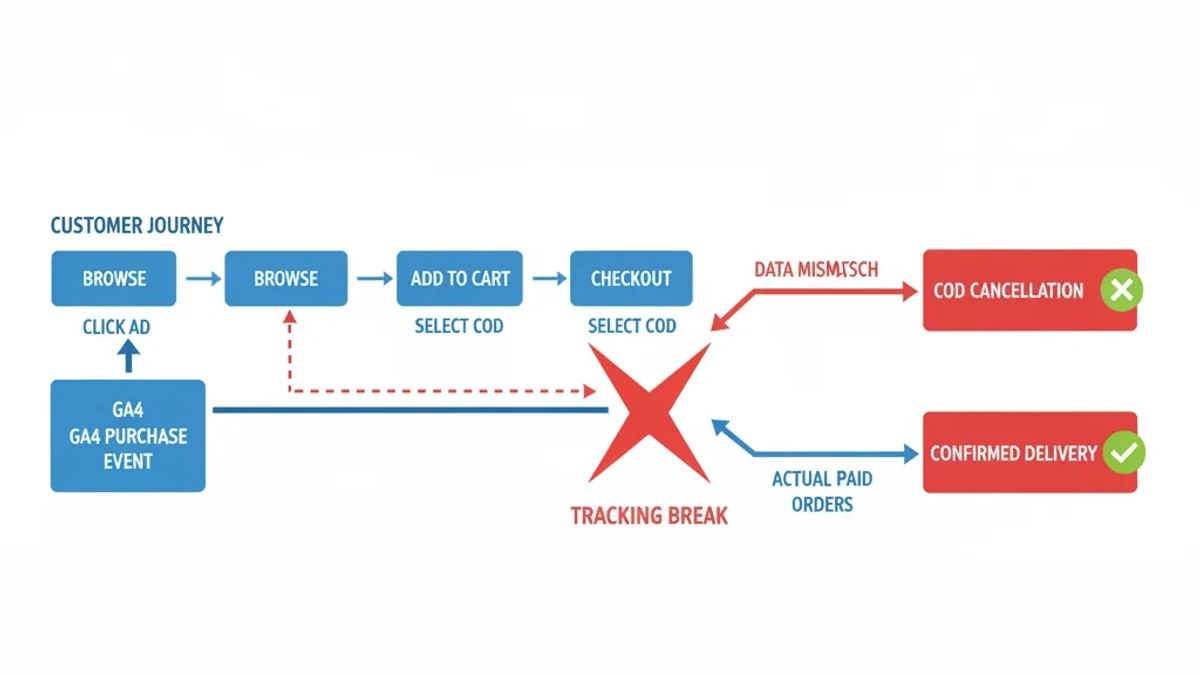
In a typical Lahore or Karachi Shopify store, the breakdown works like this: a customer clicks a Google Ad, browses products, adds an item to cart, reaches checkout, selects COD, and completes the order. In a properly configured GA4 setup, the purchase event fires once with the confirmed transaction ID, order value, and currency. In most Pakistani stores we see, the purchase event either fires prematurely — before payment method selection — or not at all, because the confirmation page redirect through JazzCash or Easypaisa’s payment gateway drops the GA4 tracking pixel.
Swetrix’s ecommerce analytics guide documents that improper purchase parameter configuration causes significant revenue underreporting across global ecommerce stores. For Pakistani stores running COD-heavy funnels, the undercount reaches 30-40% because the gap compounds: missed COD completions, dropped payment gateway redirects, and duplicate events from Shopify plugins that fire the same event twice.
The three key events errors that waste Pakistani ad budgets
Book a free strategy call - we'll audit your current setup and identify the highest-impact fixes.
Error 1: The purchase event fires before confirmation
This is the most expensive mistake. Some Shopify and WooCommerce setups fire the purchase event on the “thank you” page load — but for COD orders, the customer can still cancel before delivery. The event records a conversion that may never become revenue, and Google Smart Bidding sees this as successful and bids more aggressively for similar traffic.
Conversely, some stores fire purchase only after delivery confirmation, which means the GA4 conversion count trails reality by days. Splinternet Marketing’s analysis of GA4 conversions in Google Ads shows that when GA4 and Google Ads conversion counts differ by more than 20%, Smart Bidding optimisation degrades measurably — weaker bids, distorted ROAS calculations, and misallocated budget across campaigns.
Error 2: Enhanced ecommerce events never get configured
GA4’s enhanced ecommerce reports require specific standard events: view_item, add_to_cart, begin_checkout, and purchase. Each needs exact parameter names — transaction_id, value, currency, and an items array with item_id or item_name. Google’s developer documentation for GA4 ecommerce specifies these requirements precisely.
Digital Applied’s data shows that only 34% of GA4 properties have purchase or add_to_cart events properly implemented. The rest either never set up ecommerce tracking or used custom event names like order_complete instead of the required purchase, which breaks GA4’s built-in monetisation reports and funnel visualisation entirely.
Without the full ecommerce event chain, GA4 cannot build shopping funnel reports. You cannot see where customers drop off between product view and checkout if begin_checkout is not tracked as a key event.
Error 3: Key events are not imported into Google Ads
Even when GA4 tracks conversions correctly, many Pakistani stores fail to import these key events into Google Ads. The process requires three steps: linking GA4 and Google Ads properties, importing selected key events as conversion actions, and configuring each conversion’s value, count, and attribution window in Google Ads. Miss any step and Google Ads runs Smart Bidding with platform-only data — clicks and impressions — but no purchase revenue.
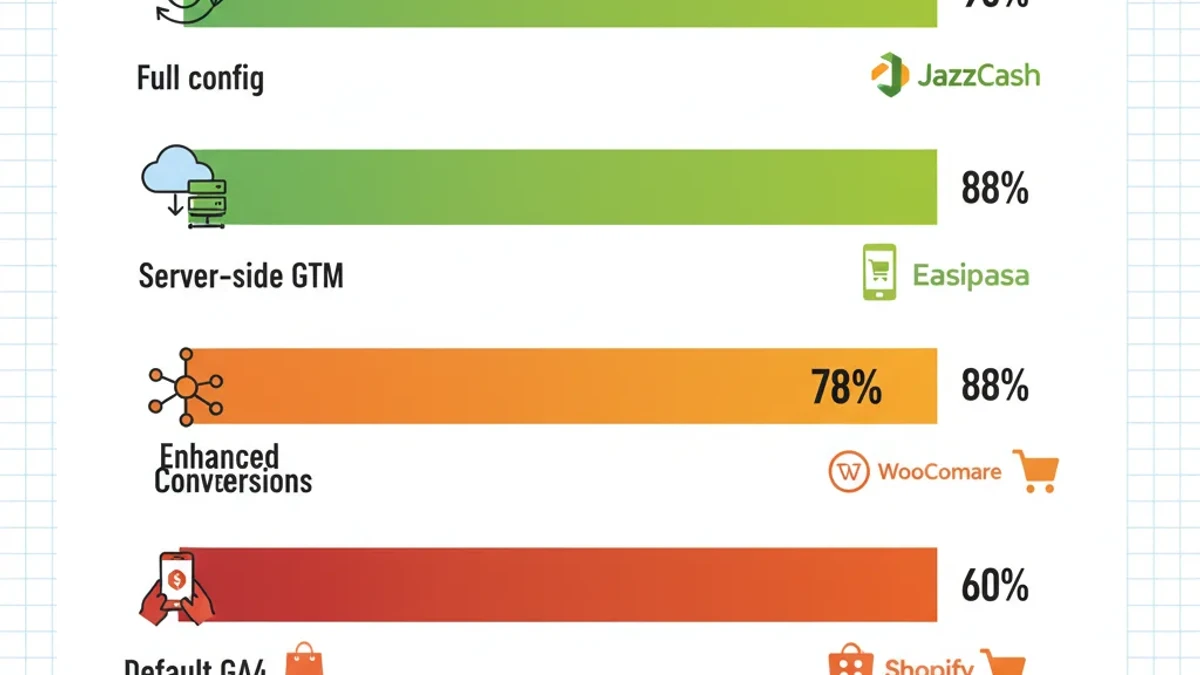
TrackBee’s guide to Enhanced Conversions reports that proper Enhanced Conversions setup improves attribution accuracy by 12-18%, which directly translates into better Smart Bidding decisions and more efficient ad spend.
The COD tracking loop: where Pakistani stores lose the signal
Consider a Karachi electronics store where most orders are cash on delivery. For every batch of orders, a portion gets cancelled before or at delivery — orders that GA4 recorded as purchase events but never generated revenue. Simultaneously, confirmed COD deliveries that do convert may not fire the purchase event if confirmation happens through a delivery app or WhatsApp message rather than the website.
The net effect is signal noise.
GA4 overcounts some conversions and undercounts others. Smart Bidding optimises toward traffic that places COD orders with high cancellation rates rather than traffic that actually pays. The tradeoff is clear: either fix the tracking or accept that your bidding algorithm is partially blind.
ALM Corp’s analysis of Enhanced Conversions shows that a single configuration switch — enabling Enhanced Conversions with hashed customer data — can recover 25-40% of conversion visibility lost to ad blockers and browser restrictions. For Pakistani stores, this is relevant because JazzCash and Easypaisa payment redirects often strip referral parameters, making cross-domain attribution unreliable without server-side data matching.
GA4 key events configuration checklist for Pakistani stores
Below is the configuration sequence we see work for Pakistani stores running Shopify or WooCommerce with COD and digital wallet payments.
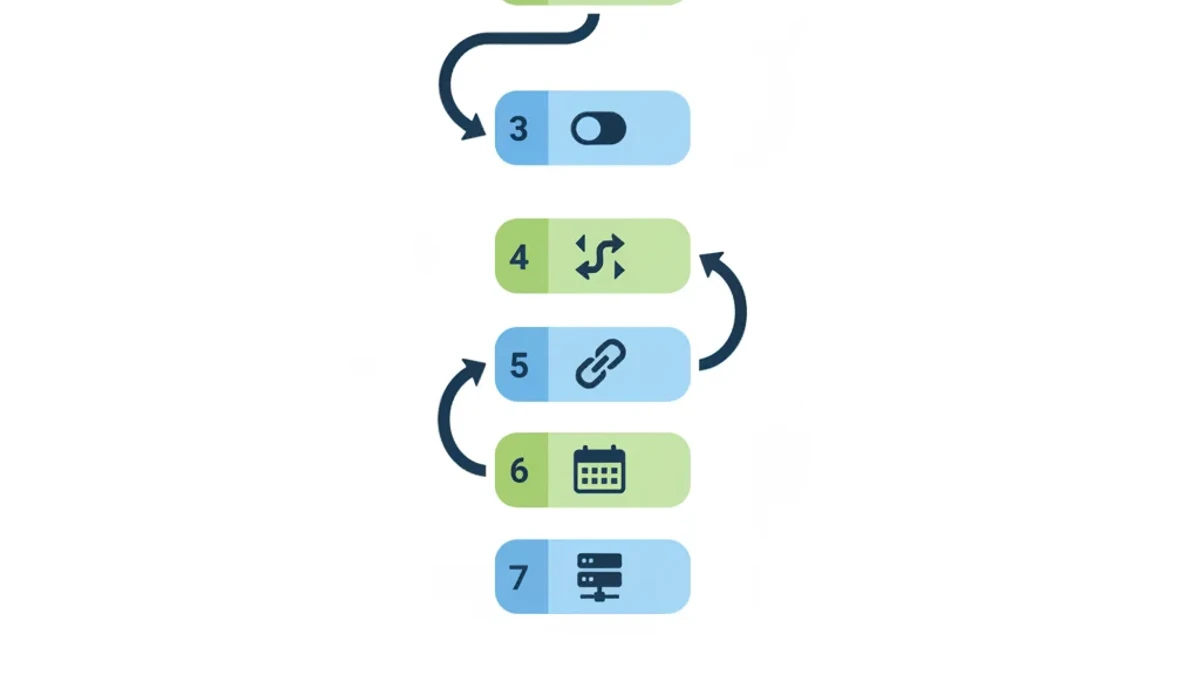
Verify event coverage. Open GA4, go to Admin, then Events. List every event currently firing. Compare against the required ecommerce events: view_item, add_to_cart, begin_checkout, purchase. If any are missing or use custom names, rename them to match Google’s standard event specifications.
Fix the purchase event firing logic. For Shopify stores, ensure the purchase event fires on the order confirmation page, not on checkout initiation. Use Shopify’s checkout webhook to fire the event only after payment confirmation for prepaid orders and after delivery confirmation for COD orders. For WooCommerce stores, configure the purchase event to fire on the “Order Received” endpoint with the actual order total from the backend.
Enable Enhanced Conversions. In GA4 Admin, go to Data Collection and enable Enhanced Measurement. In Google Ads, go to Conversions and enable Enhanced Conversions for each imported GA4 key event. This requires collecting hashed customer email and phone data at checkout — standard practice for Pakistani stores that collect phone numbers for COD delivery coordination.
Configure payment-specific conversion logic. Set up two separate key events: purchase_prepaid for JazzCash, Easypaisa, and card completions, and purchase_cod_confirmed for COD orders that reach delivery confirmation. Import both into Google Ads but assign higher value weight to prepaid conversions, which complete far more reliably than COD orders.
Import key events into Google Ads. Link GA4 to Google Ads. Import key events as conversion actions. Set value to use the GA4 event value. Set count to “Every.” Set a standard conversion window. Verify the imported conversion count in Google Ads matches GA4 within a reasonable tolerance.
Validate against your backend weekly. Compare the GA4 purchase event count against Shopify or WooCommerce completed order count every week. If GA4 shows significantly fewer conversions than backend orders, tracking is undercounting. If GA4 shows significantly more, duplicates or premature firing are inflating counts.
Connect server-side GTM for payment gateway redirects. If your store redirects through JazzCash or Easypaisa payment gateways, implement server-side GTM to maintain session continuity across domain hops. Without it, the payment redirect creates a new session in GA4, breaking the click-to-purchase attribution chain entirely.
The cost of ignoring this
How we helped a Pakistani business achieve measurable results.
A Pakistani store spending PKR 400,000 monthly on Google Ads with a 30% conversion undercount is effectively telling Google’s algorithm that a large share of its spend generates no conversions. Smart Bidding responds by reducing bids on what it considers low-performing traffic — which may actually be your best-converting customer segments.
The fix takes two to four hours for a standard Shopify or WooCommerce store.
The alternative is continuing to optimise campaigns on data that misrepresents your actual performance. For most Pakistani ecommerce operators, this is the single highest-ROI tracking fix available — and it costs nothing but configuration time.
Frequently Asked Questions
What is the difference between GA4 key events and conversions?
They are the same metric. Google renamed “conversions” to “key events” in the GA4 interface in mid-2025 while keeping the API metric name unchanged. Any event you mark as a key event in GA4 becomes eligible for import into Google Ads as a conversion action for bidding optimisation.
How does COD affect GA4 tracking for Pakistani stores?
COD creates two tracking problems: premature purchase event firing before delivery confirmation inflates conversion counts, and missing events for orders confirmed through delivery apps or WhatsApp rather than the website. Pakistani stores with high COD rates typically see a 30-40% discrepancy between GA4 reported conversions and actual completed, paid orders.
Can I set up Enhanced Conversions without server-side tracking?
Yes. Enhanced Conversions work through client-side Google Tag Manager by collecting hashed customer data — email, phone, address — at checkout and sending it securely to Google for improved attribution. Server-side GTM improves accuracy for JazzCash and Easypaisa payment gateway redirects but is not required for basic Enhanced Conversions setup. Most Pakistani stores can enable it in under an hour through the Google Ads conversion settings panel.
How much does GA4 key events configuration cost for a Pakistani store?
A basic GA4 key events audit and fix for a standard Shopify or WooCommerce store takes two to four hours of technical work. Most Pakistani marketing agencies charge PKR 15,000 to PKR 40,000 for a complete GA4 ecommerce tracking setup including Enhanced Conversions integration with Google Ads.
Sources & References
- Digital Applied — Google Analytics Statistics 2026: GA4 Adoption — April 2026
- Google Analytics Help — Manage Key Events — 2026
- Google Developers — Measure Ecommerce with GA4 — 2026
- KPMG — Pakistan Banking Perspective 2026 — April 2026
- Swetrix — Ecommerce Google Analytics Setup Guide — March 2026
- Splinternet Marketing — GA4 Conversions in Google Ads: What Counts in 2026 — April 2026
- TrackBee — The Ultimate Guide to Google Enhanced Conversions — 2026
- ALM Corp — Google Ads Enhanced Conversions: A Single Configuration Switch — 2026
- Crazy Egg — Track Key Events from GA4 as Conversions — April 2026